
- Core truth: Most resumes are ignored because an ATS filters them before any human sees them.
- How it works: The ATS parses your resume into a database and recruiters search it by exact job description keywords.
- Keyword plan: Treat the job description like evidence, pull hard skills and soft skills, then mirror the same phrasing in your resume.
- ATS safe writing: Use simple one column formatting, standard headings, and place keywords in Summary, Skills, and Experience with metrics.
- What wins: Customize every application with quick keyword swaps, avoid stuffing tricks, and write bullets that combine industry, tools, and impact verbs.
The Digital Void: Why Your Resume Is Being Ignored
You have been there. You spend four hours meticulously tailoring your resume. You agonize over fonts. You rewrite your summary 12 times. You triple-check for typos, upload the document with a surge of hope, and hit “Apply.”
And then… nothing. Not a rejection email. Not a “we’ll keep your profile on file.” Just a digital, crushing silence. You feel ghosted, unseen, and completely demoralized.
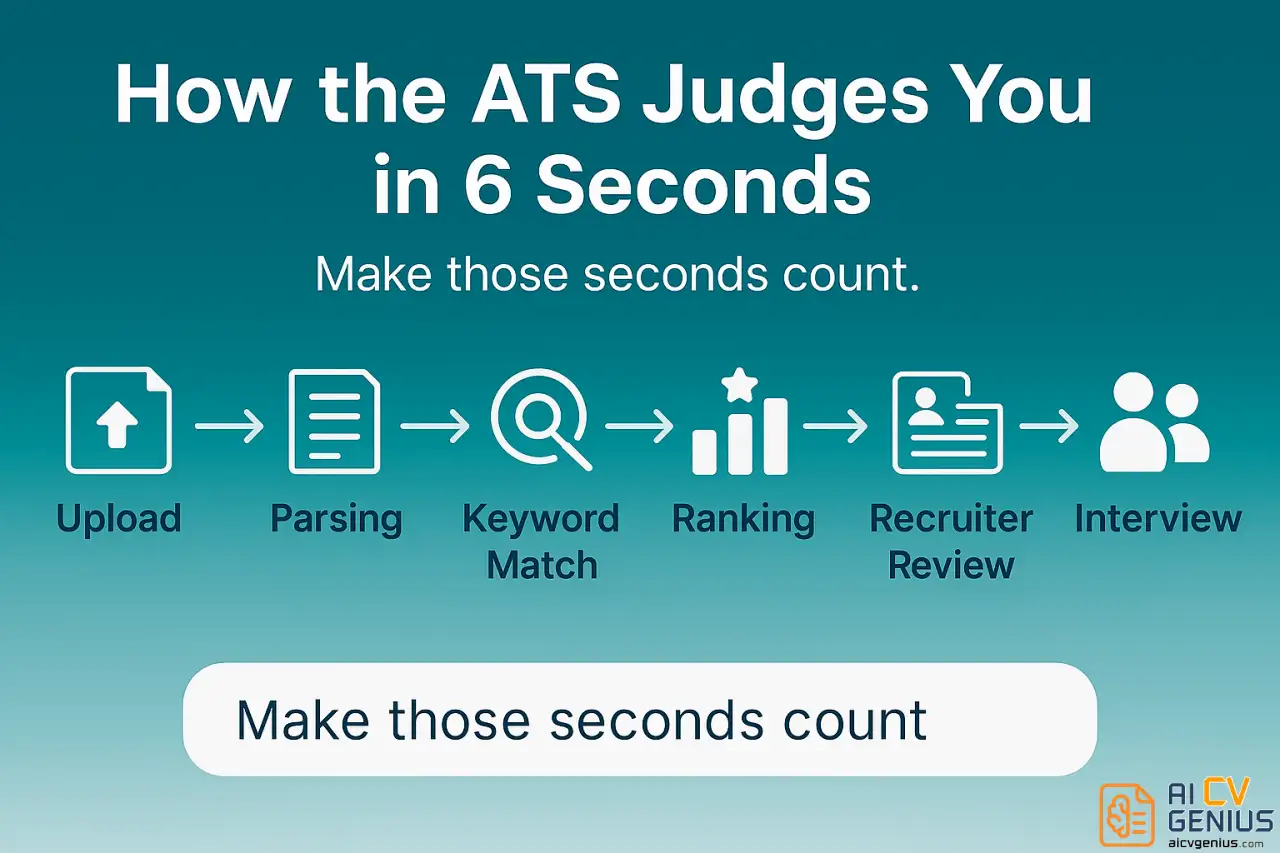
Here is the hard truth: a human being likely never saw your application. You were not rejected by a person; you were filtered by a machine. Somewhere in a server, a piece of software scanned your document for about six seconds, found a “keyword mismatch,” and silently moved your resume to the digital graveyard. That robot is the Applicant Tracking System (ATS).
Today, over 90% of large companies and a growing number of small businesses use an ATS as their primary filter. This means if your resume is not built to speak the specific language that machine is looking for, you are, for all practical purposes, invisible. This guide is not about “tricking” the system. It is about understanding its language so your story can finally be read by a human.
Meet the Gatekeeper: What Is an ATS and How Does It “Think”?
An Applicant Tracking System is a software application that manages the recruiting and hiring process. For companies drowning in hundreds – sometimes thousands – of applications for a single role, it is a tool of pure survival. It is their first line of defense against information overload.
But an ATS does not “read” your resume like a human. It does not appreciate your elegant design, your unique career path, or your witty summary. Instead, it parses it. It programmatically scans the text and sorts it into a database, breaking it down into categories: Contact Info, Work Experience, Education, and, most importantly, Skills.
Once your resume is in the database, the recruiter does not look at it. Instead, they search the database using keywords from the job description. For example:
- “Show me all candidates with ‘Project Management’ AND ‘Agile’.”
- “Filter for applicants who mention ‘Salesforce’ AND ‘Budget Forecasting’.”
- “Rank candidates by ‘SEO’ and ‘PPC’ experience.”
If your resume has a high “match rate” to these keywords, it appears at the top of the recruiter’s list. If it has a low match rate, it sinks to the bottom, never to be seen. Your entire goal is not just to have the right skills, but to use the exact phrasing the recruiter is searching for.
Step 1: Become a Job Description Detective
Your “cheat sheet” for beating the ATS is given to you every single time: it is the job description. Stop skimming it. Start dissecting it. This is the single most important step. Print it out or copy it into a text document and grab a highlighter.
Look for two types of keywords:
- Hard Skills (The “What”): These are the non-negotiable technical skills and tools. The ATS will almost always filter for these first.
- Software: “Salesforce,” “Adobe Creative Suite,” “Jira,” “Power BI”
- Methodologies: “Agile,” “Scrum,” “Financial Modeling,” “SEO/SEM”
- Certifications: “PMP,” “CISSP,” “Google Ads Certified”
- Soft Skills (The “How”): These are the behavioral keywords. Humans look for these, and newer ATS systems are learning to contextually rank them.
- “Stakeholder management”
- “Cross-functional collaboration”
- “Strategic planning”
- “Change management”
As you find these terms, especially those repeated in the “Requirements” and “Responsibilities” sections, you have found your golden tickets. Your task is to mirror this language in your resume.
Step 2: Format for the Machine, Design for the Human
This is where most people fail. A beautiful, creative resume made in Photoshop or Canva is an ATS-killer. The software cannot parse text in images, columns, or text boxes. It reads in a simple, linear path (left-to-right, top-to-bottom). If it cannot parse your content, it cannot find your keywords. Your match rate will be zero.
The ATS-Safe Formatting Checklist:
- ✅ File Type: Use .DOCX or a text-based .PDF (one you can copy and paste text from). Never use .JPEG, .PNG, or a scanned image.
- ✅ Layout: Use a simple, single-column layout. Avoid multi-column layouts, as the ATS may read them out of order (e.g., mixing your skills with your job experience).
- ✅ Fonts: Stick to standard, universal fonts like Arial, Calibri, Inter, Georgia, or Times New Roman. Avoid novelty or script fonts.
- ✅ Headings: Use standard, simple headings. The ATS is programmed to look for these:
- “Work Experience” or “Professional Experience”
- “Skills” or “Technical Skills” or “Core Competencies”
- “Education”
- “Certifications”
Do not get creative and use “My Journey” or “Things I’m Good At.” The machine will get confused.
- ✅ Bullets: Use standard round or square bullet points. Avoid complex symbols, arrows, or checkmarks.
- ✅ No Text Boxes or Tables: Do not put your skills or experience in a table or text box. The parser will likely skip it entirely.
- ✅ No Graphics or Icons: Do not use skill-rating bars, icons for your phone/email, or a photo of yourself. These are unreadable clutter to an ATS.
Your goal is to create a resume that is boringly easy for the machine to parse. The human recruiter, who will see it after it passes the scan, will appreciate the clean, skimmable clarity.
Step 3: Weave Keywords Strategically (Don’t Just “Stuff”)
In the early 2000s, you could “trick” an ATS by pasting the entire job description in white, 1pt text at the bottom of your resume. Parsers are now smart enough to detect (and penalize) this. “Keyword stuffing” – using a keyword unnaturally and repeatedly – is also a red flag for the human who eventually reads it.
The goal is integration, not repetition. Place your keywords in the three sections the ATS and the human scan the most.
1. The Professional Summary (Your “Hook”)
This 3-4 line paragraph at the top is your prime real estate. It should be packed with your most valuable, high-level keywords from the job description.
Job Description Keywords:
"SaaS," "team leadership," "strategic planning," "B2B sales cycle."
Weak Summary:
“Results-driven sales manager with 10 years of experience looking for a new opportunity.”
(Generic, no keywords).
Strong Summary:
“Senior SaaS Sales Manager with a 10-year track record in B2B sales cycle management and team leadership. Proven expertise in developing strategic planning initiatives that grew market share by 25%.”
(Specific, targeted, keyword-rich).
2. The “Core Competencies” or “Skills” Section (Your “Keyword Grid”)
This is your dedicated section for the ATS to easily find your hard skills. It acts as a keyword checklist. Do not use rating bars or percentages. Just list the skills, ideally matching the job description’s phrasing.
Good Example:
Technical Skills: Salesforce (Admin), Power BI, Tableau, Microsoft Excel (PivotTables, Macros)
Methodologies: Agile/Scrum, Project Management, B2B Sales, Budget Forecasting
This section is your safety net, ensuring the ATS scans any keywords you could not fit naturally into your experience.
3. The Professional Experience Section (Your “Proof”)
This is where you prove your keywords. You connect them to context and, most importantly, to metrics. This is what impresses the human recruiter. Use the “Action + Keyword + Metric” formula.
Job Description Keyword: “CRM optimization.”
Weak Bullet: “Responsible for CRM optimization.” (Passive, no context or result).
Strong Bullet: “Led a CRM optimization project by cleaning 10,000+ data entries and implementing new automation rules in Salesforce, resulting in a 30% increase in sales team efficiency.”
This bullet is perfect. The ATS finds the “CRM optimization” keyword. The human sees the action (“Led”), the context (“Salesforce”), and the metric (“30% increase”). This is how you write for both audiences at once.
Step 4: Customize for Every. Single. Application.
This is the step everyone hates, and it is the one that makes all the difference. Sending a generic, one-size-fits-all resume to 100 jobs is less effective than sending 10 highly customized resumes.
You do not need to rewrite your entire resume. You just need to perform a “keyword swap” that takes 10 minutes.
- Job A (a large bank) asks for: “Stakeholder management” and “Risk assessment.”
- Job B (a tech startup) asks for: “Cross-functional collaboration” and “Roadmap planning.”
Your “Core Competencies” section should be edited for each. Your “Professional Summary” should be tweaked. You might even swap one bullet point in your experience to better reflect “risk assessment” for Job A and “roadmap planning” for Job B. This 10-minute tweak can be the difference between a 30% keyword match (instant rejection) and an 80% match (top of the pile).
If you hate this manual work, build your resume in a clean, easy-to-edit format. Our Resume Templates Finder provides formats that are both ATS-safe and easy to update quickly, so you can customize without breaking the layout.
Step 5: The “Golden Triad” of Keywords (Industry, Tools, Impact)
Advanced ATS systems and smart recruiters look for three types of keywords in a single thought. The best bullet points contain all three.
- Industry Keywords: These show you know the business. (e.g., “SaaS,” “Healthcare,” “E-commerce,” “Logistics,” “FinTech”).
- Tool Keywords: These show your hard skills. (e.g., “Salesforce,” “SQL,” “Canva,” “Python,” “Google Analytics”).
- Impact Keywords (Verbs): These show what you did. (e.g., “Optimized,” “Led,” “Reduced,” “Increased,” “Delivered,” “Managed”).
Let’s build a “Golden Triad” bullet:
“Managed [Impact] a SaaS [Industry] product launch by coordinating Jira [Tool] tickets, resulting in a 15% increase in Q2 user acquisition.”
That single sentence is keyword gold. It is also a compelling story for a human reader.
Story Time: Emma vs. The Algorithm
Emma, a marketing coordinator, had applied to 27 “Marketing Manager” jobs and heard nothing back. She was qualified, but her resume was invisible. We looked at her resume next to a target job description.
Job Description Keywords:
"client onboarding," "CRM," "reporting," "email campaigns."
Emma’s Old Bullet:
“Handled new client accounts and managed weekly reports for the team.”
(Vague, no keywords, no metrics).
We rewrote it to mirror the job description and add impact.
Emma’s New Bullet:
“Streamlined the client onboarding process for 30+ accounts; managed all email campaigns and CRM reporting in HubSpot, increasing client retention by 15%.”
The result? She applied to five more jobs with her new, optimized resume and got three interview callbacks within a week. She did not get new experience. She just learned to speak the right language.
The Future: AI, Synonyms, and Semantic Search
The arms race continues. As people got better at keyword stuffing, ATS developers got smarter. Modern, AI-driven systems (like Greenhouse, Lever, and Workday) are moving beyond exact-match keywords to semantic search.
This means the system understands context and synonyms. If the job asks for “Microsoft Excel,” the ATS is now smart enough to also rank resumes that mention “PivotTables,” “VLOOKUP,” or “spreadsheet modeling.” It understands that “managed a team” is semantically similar to “team leadership.”
What does this mean for you? It means that while precise keywords are still your primary weapon, the future is moving toward what humans already value: clear, well-written descriptions of your achievements.
Do not just write “Project Management.” Write “Led a cross-functional project to deliver the new software 2 weeks ahead of schedule.” The AI will understand this as proof of project management, and the human will be impressed by the result.
In-Depth FAQ: Your Keyword Survival Guide
- .DOCX (Word Doc): Universally parsable by every ATS, new or old. It is the safest bet if you are unsure of the company’s system. The risk is that a human opening it on a different system (e.g., Mac vs. PC) might see formatting errors.
- .PDF (Text-Based): This is the best option, IF it’s a text-based PDF. It locks in your formatting so it looks identical to humans, and 99% of modern ATS can parse it perfectly. (Test: If you can click, drag, and copy the text from your PDF, it’s text-based. If it’s one big image, it’s unscannable).
Verdict: Use a text-based PDF. Only use .DOCX if the application form specifically requests it.
- Manual (Free): Use a simple online “word cloud” generator. Paste your resume text into one, and paste the job description into another. Compare the clouds. Are the biggest, most prominent words the same?
- Tools (Freemium): Services like Jobscan or Resume Worded are built for this. They will give you a “match rate” by directly comparing your resume to a job description and tell you exactly which keywords you are missing.
- Substitute: If the job requires “Salesforce” and you have “HubSpot,” list “HubSpot” and call it “CRM Software” in your skills section.
- Show Transferable Skills: If it requires “Budget Management” and you have not formally managed one, use a bullet like: “Tracked and reported on $50K in project expenses, ensuring 100% adherence to the allocated budget.” This proves the skill without claiming the title.
- Use a Project: “Gained proficiency in ‘Power BI’ by developing a personal dashboard to track S&P 500 trends (project link on GitHub).”
Closing Thoughts: Humans Still Hire Humans
It is easy to get cynical and feel like you are just writing for a machine. But remember: the ATS is not the one who hires you. It is just the bouncer at the door. Your goal is to get past the bouncer so you can talk to the hiring manager.
And that human manager is not looking for a list of keywords. They are looking for a story. They are looking for proof. They are looking for a colleague. Optimize your resume with the precision of a robot, but write it with the heart of a human. Tell your story, show your impact, and use keywords as the bridge to connect the two.
You are not invisible. You just need to learn the language. Now go get seen.