
- Why Office still matters in 2026: It is the baseline language of modern work, and recruiters assume you can use it well.
- What “Office skills” really signal: Attention to detail, efficiency, communication clarity, and reliability in day to day execution.
- What to prove for each tool: Excel for analysis and dashboards, Word for structured docs and collaboration, PowerPoint for persuasive storytelling, Outlook for organization.
- How to show it on your resume: Replace “Proficient in Microsoft Office” with action, context, and a result that includes a metric.
- How to list it the smart way: Name specific features like PivotTables, XLOOKUP, Mail Merge, Slide Masters, Teams, SharePoint, and add MOS if you have it.
Why Microsoft Office Fluency is Non-Negotiable in 2026
In an era defined by disruptive AI, sleek cloud-native apps, and niche productivity tools, a simple fact remains: the working world runs on Microsoft Office. The ability to craft a compelling argument in Word, build a financial model in Excel, and tell a persuasive story in PowerPoint is not a “nice-to-have” skill. It is the fundamental grammar of modern business.
That is why a microsoft office skills resume continues to be one of the most powerful, practical assets a candidate can have. Despite the rise of competitors, Office remains the entrenched, compatible, and expected standard. Recruiters and hiring managers do not just prefer it; they presume it. When they see a resume that demonstrates not just basic familiarity but true fluency, it sends a powerful, immediate signal: this person is professional, detail-oriented, and ready to contribute from day one.
This guide is not about listing “MS Office” in your skills section. It is about proving your proficiency through tangible, high-impact examples that make you a more attractive hire than the candidate next to you. We will explore how to frame these skills not as a boring requirement, but as a strategic advantage.
The Recruiter’s Psychology: What “Office Skills” Really Signal
When a hiring manager scans for Office skills, they are not just checking a box. They are looking for deeper, underlying traits that predict your success in the role.
- ✅ Attention to Detail: A candidate who can create a perfectly formatted Word document or a clean, logical Excel sheet is perceived as someone who cares about quality and precision. A sloppy document signals sloppy thinking.
- ✅ Efficiency & Productivity: Knowing the tools means you will not waste time. You will not struggle to format a presentation or spend hours manually entering data that an Excel formula could handle in seconds. This means a faster ramp-up time and less strain on your manager.
- ✅ Communication Clarity: PowerPoint is a test of your ability to synthesize complex information. Excel is a test of your analytical communication. Word is a test of your written professionalism. Fluency in these tools proves you can communicate effectively in a business context.
- ✅ Reliability: Employers need to know you can be trusted with the basic functions of a modern job – managing a calendar in Outlook, collaborating on a report, or presenting to a client. Proficiency equals reliability.
Proving your fluency is your first opportunity to show you are a low-risk, high-efficiency candidate who understands the language of the workplace.
Beyond the Basics: An In-Depth Look at Each Tool
Saying you “know Excel” is like saying you “know how to cook.” Do you mean you can make toast, or can you prepare a five-course meal? The difference is in the details. Here is how to prove you are a “chef” with each tool.
1. Microsoft Excel: The Tool for Analysis and Decision-Making
What employers assume you know: Basic data entry, SUM formulas, simple formatting.
What actually impresses them: Your ability to turn raw, messy data into clean, actionable insights. This shows analytical thinking and business acumen.
Skills that matter:
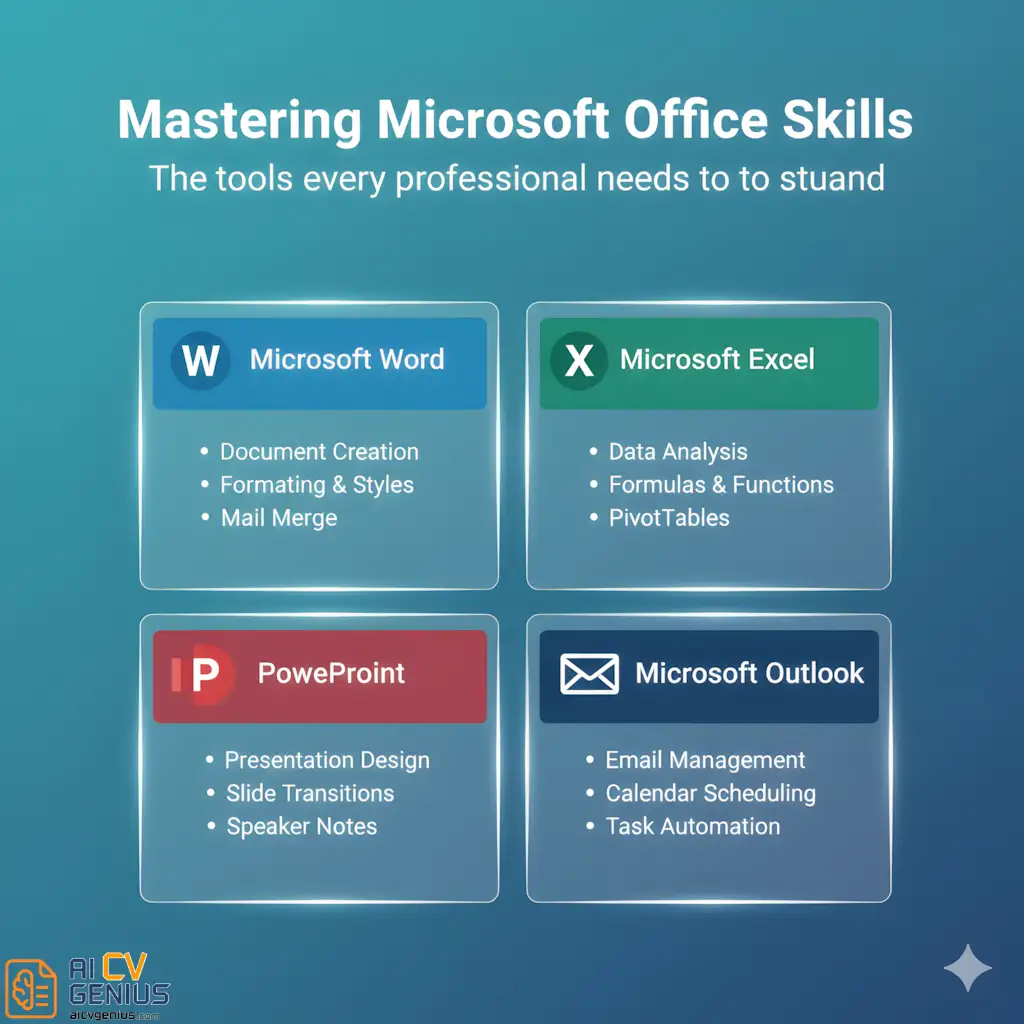
- Data Cleaning: Using functions like TRIM, CONCATENATE, and Text to Columns to make data usable.
- Data Analysis: PivotTables are the gold standard. They prove you can summarize vast datasets instantly.
- Data Lookups: VLOOKUP is the classic, but mentioning XLOOKUP signals you are up-to-date and more efficient.
- Data Visualization: Creating clean charts, graphs, and Dashboards that tell a story.
- Automation: Using Macros or Conditional Formatting to automate repetitive tasks and highlight key information.
Resume Example: “Built an automated Excel dashboard using PivotTables and XLOOKUP to track weekly sales data, reducing manual reporting time by 40% and providing real-time insights to leadership.”
2. Microsoft Word: The Tool for Professional Communication
What employers assume you know: Typing, changing fonts, spell check.
What actually impresses them: Your ability to create structured, professional, and brand-compliant documents that are easy to read and navigate. This shows professionalism and communication skill.
Skills that matter:
- Formatting: Using Styles and Templates to ensure consistency across long documents.
- Layout: Properly using page breaks, sections, headers, and footers.
- Automation: Using Mail Merge to personalize hundreds of letters or emails in minutes.
- Collaboration: Effectively using Track Changes and comments to manage feedback from a team.
Resume Example: “Developed a new set of Word templates for all client-facing proposals, incorporating Styles and Quick Parts, which saved 3 hours per week for the sales team and ensured 100% brand consistency.”
3. Microsoft PowerPoint: The Tool for Persuasion and Storytelling
What employers assume you know: Putting bullet points on a pre-made template.
What actually impresses them: Your ability to synthesize complex ideas into a clear, visually engaging, and persuasive narrative. This is a test of your strategic communication skills.
Skills that matter:
- Design & Layout: Understanding alignment, white space, and visual hierarchy. Not just filling space, but guiding the eye.
- Consistency: Using Slide Masters to create a custom, professional template.
- Data Visualization: Embedding and animating Excel charts, creating Infographics (via SmartArt or custom shapes), and making data understandable.
- Narrative: Structuring a deck to tell a story (Problem > Solution > Benefit) rather than just presenting a list of facts.
Resume Example: “Designed and delivered a 25-slide PowerPoint deck for a Series B funding pitch; visualized complex market data into 5 key infographics that helped secure $10M in new investment.”
4. Microsoft Outlook: The Tool for Productivity and Time Management
What employers assume you know: Sending and receiving email.
What actually impresses them: Your ability to use Outlook as a command center to manage your time, protect your focus, and coordinate with your team. This shows organization and professionalism.
Skills that matter:
- Calendar Management: Expertly scheduling for large groups, managing time zones, and using scheduling assistant.
- Email Organization: Using Rules, folders, and categories to manage high volumes of email and maintain a “zero-inbox.”
- Efficiency: Using Quick Steps and templates to automate common responses.
- Task Management: Integrating Microsoft To Do with flagged emails and calendar tasks.
Resume Example: “Managed complex scheduling and correspondence for a 15-member executive team across three time zones, streamlining all internal communication and ensuring zero booking conflicts for 12 consecutive months.”
5. The Modern Additions: Teams & SharePoint
No discussion of “Microsoft Office” is complete without its cloud components. Mentioning these signals you are fluent in modern, hybrid-work environments.
- Teams: This is the collaboration hub. Mentioning it implies you are skilled in asynchronous communication, virtual meetings, and channel organization.
- SharePoint/OneDrive: This shows you understand cloud storage, version control, and file sharing permissions.
Resume Example: “Managed a cross-departmental project dashboard by integrating Excel reports directly into a Microsoft Teams channel, providing real-time visibility and reducing status update meetings.”
How to Showcase Office Skills on Your Resume
How to Describe Microsoft Office Skills on a Resume: From Weak to Unforgettable
The biggest mistake is simply listing “Microsoft Office” in your skills section. It is a passive claim. You must prove your skill by embedding it into your achievements. When deciding how to describe microsoft office skills on a resume, use the “Action + Context + Result” formula.
A weak line is a claim. A strong line is a story with a metric.
“Created automated Excel dashboards and designed client presentations in PowerPoint to visualize quarterly KPIs.”
That single line proves advanced Excel, data visualization, and PowerPoint skills while also demonstrating business acumen. Let’s look at more transformations.
| Weak Line (Passive Claim) | Strong Line (Action + Context + Result) |
|---|---|
| “Proficient in Microsoft Office.” | (This line should be deleted and replaced with achievement-based bullets.) |
| “Used Excel for data entry.” | “Developed an Excel tracking system for 150+ vendor invoices, reducing data entry errors by 90% and automating monthly reports.” |
| “Made PowerPoint presentations.” | “Designed a new 30-slide sales deck in PowerPoint using custom Slide Masters, which was adopted by the entire 20-person sales team.” |
| “Handled team scheduling.” | “Managed all-hands scheduling for a 200-person hybrid department using Outlook, coordinating 15+ stakeholders without conflicts.” |
| “Good with Microsoft Word.” | “Used Word’s Mail Merge feature to personalize and distribute a 1,000-customer mailer, increasing response rate by 15%.” |
More Microsoft Office Skills Examples for Resume (By Role)
Tailor your examples to the job you want. An admin’s Excel skills are different from a financial analyst’s. Here is how to frame your proficiency for different roles.
| Role | Example Resume Line |
|---|---|
| Administrative Assistant | “Managed complex calendars for three C-level executives in Outlook; automated monthly expense reports using Excel, saving 10+ hours per month.” |
| Marketing Specialist | “Analyzed campaign performance using Excel PivotTables to identify high-value segments; presented findings to leadership in a concise PowerPoint deck.” |
| Teacher or Trainer | “Developed interactive lesson plans and student progress trackers in Excel; created engaging, media-rich presentations in PowerPoint for 5 different courses.” |
| Sales Executive | “Designed persuasive pitch decks in PowerPoint for enterprise clients; managed a 500+ prospect pipeline using Mail Merge in Word and Outlook.” |
| Engineer / Technical Role | “Authored 50+ pages of detailed technical documentation in Word using advanced formatting and styles; modeled project cost data in Excel.” |
| Financial Analyst | “Built dynamic financial models in Excel (VLOOKUP, PivotTables) to forecast quarterly revenue, achieving 98% accuracy against actuals.” |
| Project Manager | “Tracked project milestones and budgets for a 10-person team in Excel; managed all stakeholder communication and meetings via Outlook and Teams.” |
How to List Microsoft Office in Your Skills Section (The Smart Way)
Even if you prove your skills in your experience section, it is still wise to list them in your “Technical Skills” or “Core Competencies” section for ATS (Applicant Tracking System) scanners. But do not just list “Microsoft Office.” Be specific and honest about your proficiency level – not by using vague words, but by listing the functions you know.
Instead of this (Vague):
Skills: Microsoft Office (Advanced), Excel (Intermediate), Word (Expert)
This is subjective and means nothing. What does “Advanced” mean?
Do this instead (Specific & Credible):
Technical Skills
- Microsoft Excel: PivotTables, XLOOKUP, Conditional Formatting, Dashboards, Macros
- Microsoft PowerPoint: Slide Masters, Data Visualization, Animations, Templates
- Microsoft Word: Styles & Formatting, Mail Merge, Track Changes, Templates
- Microsoft 365: Teams, SharePoint, Outlook Calendar Management, OneDrive
This format is infinitely more powerful. It gives the recruiter a concrete list of your capabilities. It shows you understand the tools deeply enough to know what matters. Mention certifications like Microsoft Office Specialist (MOS) here as well; it adds instant, verifiable credibility.
Real Story: Turning “Basic” Skills into Career Leverage
I once worked with a logistics coordinator named John who thought his resume was ordinary. His skills section just said “MS Office.” We dug into his daily work and found gold. He spent hours every month compiling delivery data from 10 different supplier spreadsheets – a task he hated.
We rewrote that “boring” task into a high-impact achievement:
“Consolidated delivery data from 10 disparate supplier files using Excel macros and PivotTables, reducing monthly reporting time from 5 hours to just 45 minutes.”
His work did not change – but how he presented it did. That one bullet point reframed him from a simple “coordinator” to an “efficiency expert.” He got two interview calls within a week for higher-level analyst roles. This is the power of framing.
“Employers don’t pay you for knowing Office. They pay you for the time you save, the clarity you create, and the problems you solve with it.”
Deeper Context and FAQs
Linking Office Proficiency to Valuable Soft Skills
Your Office skills are silent proof of your soft skills. When you write your bullet points, you are also telling the recruiter:
- Advanced Excel implies Analytical Thinking and Problem Solving.
- Great PowerPoint implies Strategic Communication and Persuasion.
- Organized Outlook implies Time Management and Reliability.
- Clean Word Docs imply Attention to Detail and Professionalism.
You are not just a tool user; you are a methodical professional who uses tools to execute valuable soft skills. This is how you make “basic” skills sound strategic.
For more advice on blending hard and soft skills, our Career Resources page offers detailed guides. You can also see how these skills are laid out in our Resume Templates Finder.
Pros & Cons of Emphasizing Microsoft Office on a Resume
| Pros | Cons |
|---|---|
|
|
In-Depth FAQs About Microsoft Office Skills
Example: “Maintained 100% accuracy on all data entry tasks in Excel for 12 consecutive months.”
Example: “Used Word templates to prepare 20+ client letters weekly with zero formatting errors.”
This shows you are careful and dependable.
Example: “Fluent in both Microsoft 365 (Excel, PowerPoint) and Google Workspace (Sheets, Slides) for seamless collaboration.”
Example (Developer): “Used Excel to track and prioritize bug backlogs” or “Authored clear technical documentation in Word for non-technical stakeholders.”
Example (Designer): “Presented design concepts and user feedback data to leadership using compelling PowerPoint decks.”
This shows you can bridge the gap between technical/creative work and business needs.
Final Thoughts: The Universal Language of Work
Mastering Microsoft Office is no longer optional – it is the baseline expectation for a professional candidate. But simply listing it is not enough. A microsoft office skills resume that truly stands out is one that proves fluency.
It shows you are organized, analytical, and ready to communicate professionally from your very first day. Whether you are formatting documents, analyzing complex trends, or designing persuasive presentations, these tools remain the bridge between your ideas and their execution. Use them well, describe them with impact, and you will always appear one step more capable and reliable than your competition.