
- Remote demand: Remote roles draw a global applicant pool, so recruiters look for proof you can deliver without supervision.
- Headline signal: Add “Remote” or “Open to Remote” so you show up in remote keyword searches and look intentional.
- Location choice: Keep your real city in most cases, then clarify remote availability in the headline and About to avoid losing local search reach.
- About section keywords: Use remote-ready terms like async communication, distributed teams, time zone coordination, plus the tools you actually use.
- Skills strategy: Mix 3 to 5 core role skills with 5 to 7 remote tools and collaboration skills so your profile reads remote-capable, not remote-wanting.
Show Recruiters You’re Ready for Remote Work
Remote jobs are more competitive than office-based roles. For every remote position, hundreds of candidates apply from across the country or globe. Recruiters need to filter somehow.
One way they filter: they search for signals that candidates are prepared for remote work. Not just willing to work remotely, but actually equipped with the tools, experience, and mindset that distributed teams require.
Your LinkedIn profile needs to signal remote-readiness in four key sections: headline, location, summary, and skills. Each section uses specific keywords and framing that remote recruiters search for.
This guide shows exactly what to add to each section to maximize visibility for remote opportunities.
Section 1: Headline – Add “Remote” Explicitly
Your headline is the most important line on your profile. It appears in search results, connection requests, and comments. Remote recruiters often filter searches by the word “remote” or “open to remote.”
Weak Headlines for Remote Jobs
“Software Engineer at TechCorp”
“Marketing Manager with 5 years experience”
These don’t signal remote availability. Recruiters won’t know you’re interested in remote work.
Strong Headlines for Remote Jobs
Include “Remote” or “Open to Remote” directly in your headline:
- Software Engineer | Python, React | Open to Remote Opportunities
- Remote Product Manager | B2B SaaS | Ex-Google
- Marketing Manager | SEO & Content Strategy | Remote Work Advocate
- Data Analyst | SQL, Tableau, Python | Seeking Remote Roles
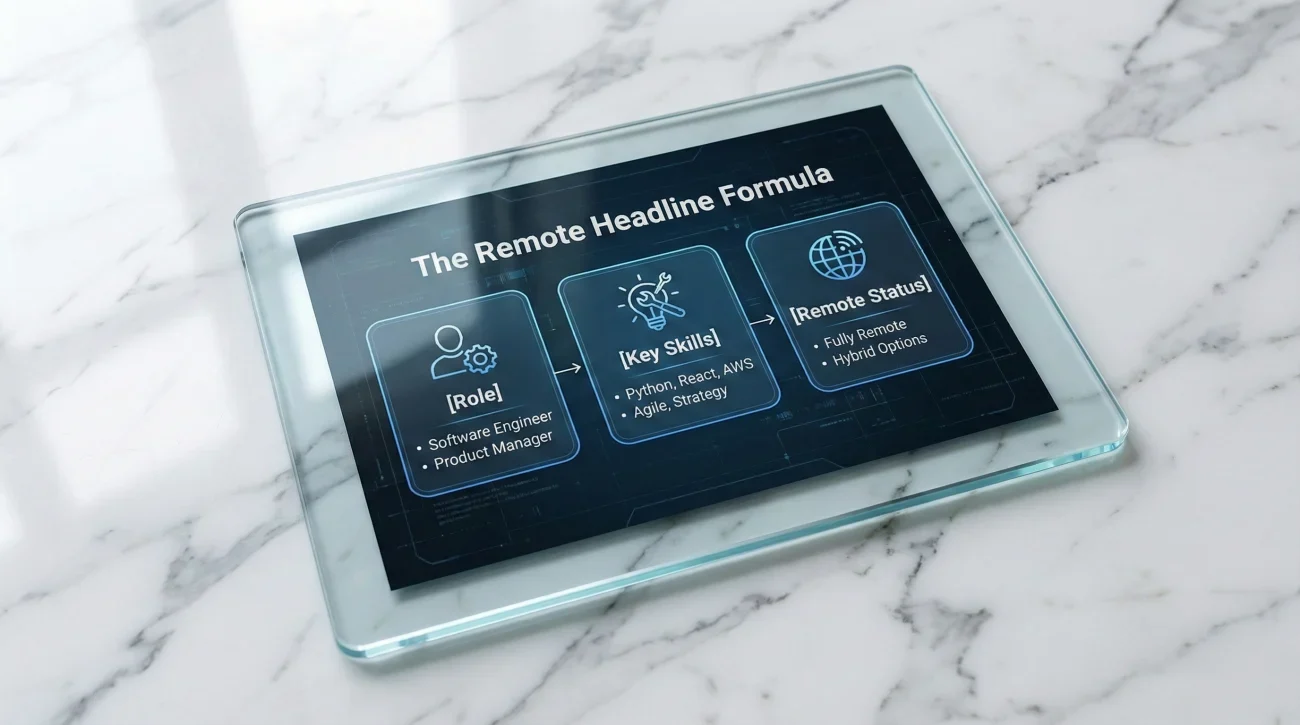
The formula: [Your Role] | [Key Skills] | Remote/Open to Remote | [Optional Credential]
Where to Put “Remote”
Place it in the second half of your headline, after your core skills. This way you show up in both general searches (Product Manager) and remote-specific searches (Remote Product Manager).
For comprehensive profile optimization, see our complete LinkedIn and resume guide.
Section 2: Location – “Remote” vs. Your City

This is tricky. LinkedIn’s location field affects search results, but “Remote” isn’t always the best choice.
Three Options
Option 1: Set location to “Remote”
- ✅ Shows up in searches for “remote” location
- ❌ Might filter you out of city-specific searches
- ❌ Loses local networking opportunities
Option 2: Keep your actual city
- ✅ Appears in local searches
- ✅ Maintains regional network
- ❌ May not show up in pure “remote” location filters
Option 3: Your city + clarify in headline/summary
- ✅ Best of both approaches
- ✅ Local connections remain
- ✅ Headline signals remote availability
Recommended Approach
Keep your actual location (e.g., “Austin, Texas”) but add “Open to Remote” in your headline and mention remote work in your summary.
Why this works: recruiters searching for your skills + your city will still find you, AND you’ll appear in keyword searches for “remote” because it’s in your headline and summary. You don’t lose either advantage.
Exception: If you’re already fully remote and have no ties to a specific location, setting location to “Remote” is fine.
Section 3: Summary – Remote-Specific Keywords
Your About section needs to include keywords that remote recruiters search for. These terms signal you understand distributed work.

Essential Remote Work Keywords
Work Style Keywords:
- Asynchronous communication
- Self-motivated / Self-directed
- Remote collaboration
- Distributed teams
- Time zone coordination
- Remote-first experience
Tool Keywords:
- Slack, Microsoft Teams, Discord
- Zoom, Google Meet
- Jira, Asana, Trello
- Notion, Confluence
- GitHub, GitLab
Outcome Keywords:
- Delivered projects remotely
- Managed remote teams
- Coordinated across time zones
- Built remote-first processes
Example Summary for Remote Work
Product Manager with 5 years building SaaS products for distributed teams. I’ve led product development remotely across 3 time zones, coordinating with engineering, design, and marketing through asynchronous communication and clear documentation.
Tools I use daily: Jira, Slack, Figma, Notion. Comfortable managing complex projects without synchronous meetings – I default to written updates and async video when real-time collaboration isn’t needed.
Currently seeking remote product roles at Series A-B companies building tools for knowledge workers. Open to opportunities anywhere.
Why this works:
- Mentions “remote” and “distributed teams” explicitly
- Includes asynchronous communication (key remote skill)
- Lists common remote tools
- Shows understanding of remote work principles (async > sync)
- Ends with “open to opportunities anywhere”
What NOT to Say
Avoid generic claims without evidence:
“I’m great at working independently and love the flexibility of remote work.”
This sounds like you want remote work for lifestyle reasons, not because you’re equipped for it. Focus on capabilities and experience, not preferences.
Section 4: Skills – Remote Tools and Collaboration
LinkedIn’s Skills section is searchable. Add 10-15 skills, prioritizing tools and capabilities remote teams use.
Technical Skills (If Relevant to Your Role)
- Programming languages (Python, JavaScript, etc.)
- Platforms (AWS, Google Cloud, etc.)
- Design tools (Figma, Adobe Suite, etc.)
Remote Work Skills
Add these explicitly:
- Remote Team Management
- Asynchronous Communication
- Cross-functional Collaboration
- Virtual Presentations
- Documentation
Remote Tools (Choose Relevant Ones)
Communication:
- Slack
- Microsoft Teams
- Zoom
- Discord
Project Management:
- Jira
- Asana
- Trello
- Monday.com
Documentation:
- Notion
- Confluence
- Google Docs
Version Control / Collaboration:
- GitHub
- GitLab
- Figma
Prioritization Strategy
List 3-5 core skills for your role, then 5-7 remote-relevant skills/tools. This balances role expertise with remote readiness.
Example for a software engineer:
- Python
- React
- SQL
- GitHub
- Jira
- Asynchronous Communication
- Remote Team Collaboration
- Slack
For more remote work strategies, explore our career transition guide.
Bonus: How to Search for Remote Jobs on LinkedIn
After optimizing your profile, use these search filters to find remote opportunities:
Essential Filters
- Go to LinkedIn Jobs
- Search for your target role (e.g., “Product Manager”)
- Click “All Filters”
- Under “Location,” select “Remote”
- Under “Date Posted,” choose “Past 24 hours” or “Past Week” (newer jobs = less competition)
- Under “Experience Level,” select your level
Search Keywords That Work
Add these to your job title search:
- “Remote” (e.g., “Remote Marketing Manager”)
- “Distributed” (e.g., “Software Engineer Distributed Team”)
- “Work from anywhere”
- “Remote-first company”
Set Up Job Alerts
After configuring your search with filters, click “Create search alert.” LinkedIn will email you new remote jobs matching your criteria daily.
Create 3-5 alerts with variations:
- Your exact job title + remote
- Alternative job titles + remote
- Your skills + remote
This ensures you see new remote postings before they’re flooded with applicants.
FAQ
Remote Readiness Is About Signals, Not Just Preference
Saying you want to work remotely isn’t enough. Remote recruiters need to see signals that you’re equipped for distributed work: the right tools, the right communication style, and understanding of async collaboration.
The four key sections – headline, location, summary, and skills – give you opportunities to showcase these signals. Add “remote” to your headline. Keep your city as location but clarify remote availability. Use remote work keywords in your summary. List collaboration tools in your skills.
These changes take 30 minutes but dramatically increase your visibility in remote job searches. Combined with strategic job search filters (location: remote, date posted: past week), you’ll see opportunities you’re actually qualified for before hundreds of other applicants flood in.
Start by updating your headline today. Then work through summary and skills this week. The effort compounds – each optimization makes you more discoverable to the growing number of companies hiring remote talent.
For additional remote work and LinkedIn resources, check out our comprehensive career guide.