
- Testing method: We tested 10+ tools and graded AI quality, customization, ATS formatting, truly free access, and ease of use.
- Top picks: Kickresume is best for GPT-4 draft but only one free letter, Enhancv is truly free and matches resume styling, Zety is guided but paywalled to download.
- More options: Grammarly is free and strongest for career changers and editing, Freesumes is no signup and fastest but needs heavy personalization.
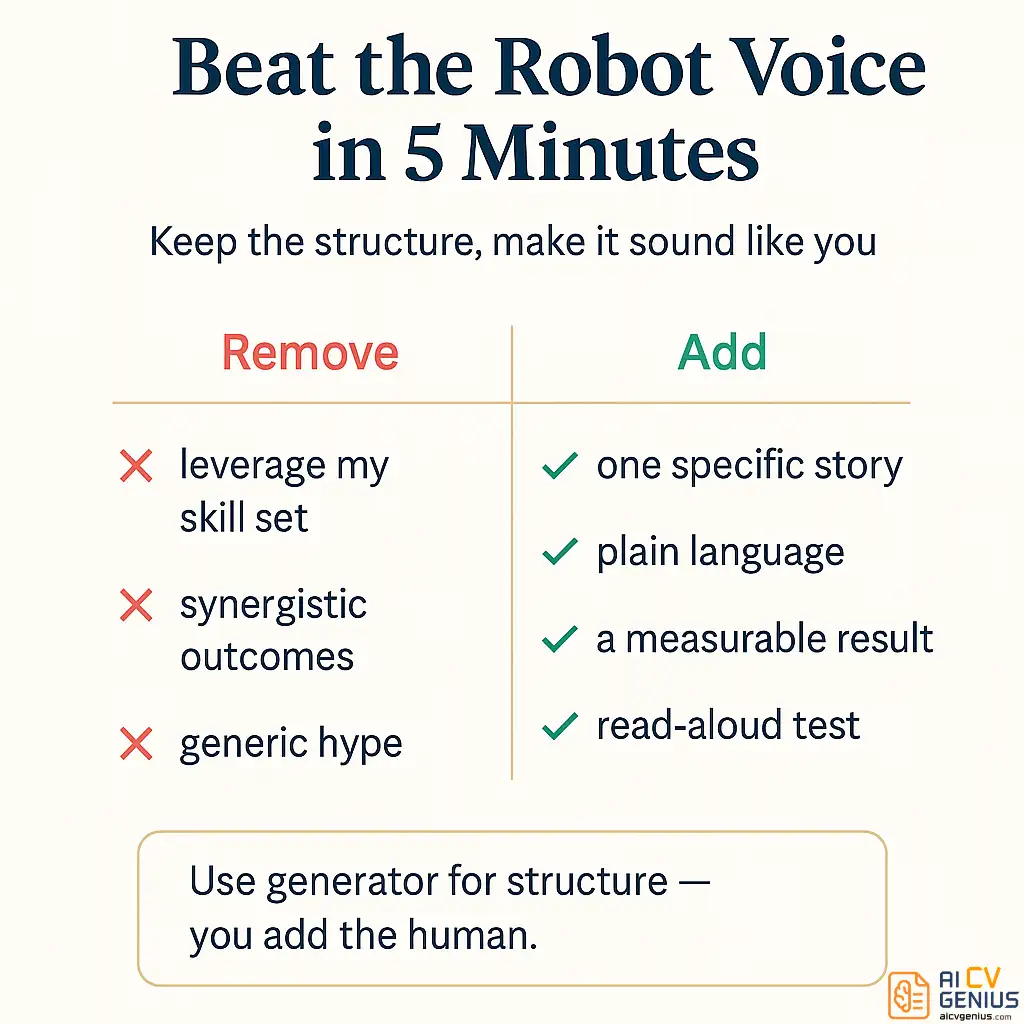
- Main risk: Hiring managers spot robotic AI fast, fix it by cutting clichés, using plain English, adding one real story, and reading it out loud.
- Best workflow: Generate with real details, purge jargon, replace the generic middle with a STAR proof paragraph, then do a quick ATS check before sending.
You need a cover letter. You hate writing them. Let’s be honest – everyone does. It’s the single most-dreaded part of any job application. You’re a professional, you’re great at your job, but suddenly you’re expected to be a creative writer, a marketing expert, and a persuasive salesperson, all in 300 words. So you do what any logical person in 2026 does: you search for a “free cover letter generator.” And just like that, you’re drowning in a sea of AI tools, all promising to write the “perfect, professional letter” in 60 seconds.
But here’s the trap they don’t warn you about: most of these AI generators produce robotic, soulless, corporate-speak. They create letters filled with meaningless phrases like “leveraging my synergistic skill set” and “I am a results-driven professional.” And here’s the critical part: hiring managers can spot that a mile away. They don’t just dislike these letters; they hate them. Why? Because it signals a total lack of effort. It tells them you’re just playing a numbers game and don’t care about this specific job.
When you’re applying for jobs that actually matter, the best free cover letter generator 2026 isn’t just fast. It’s smart. It’s nuanced. It’s a tool that’s sophisticated enough to sound like you on your best day, not like ChatGPT’s most awkward and formal cousin. The goal isn’t to find a “one-click” solution; it’s to find a tool that gets you 80% of the way there, saving you hours of pain while leaving room for that crucial, human 20% that actually gets you the interview.
We tested over 10 of the most popular cover letter generators – the free ones, the “freemium” ones, and the paid-only tools – to see which ones actually deliver. We looked at the quality of the AI, the ease of use, true ATS compatibility, and whether their “free” plan is genuinely free or just a frustrating bait-and-switch. Some tools shocked us with their quality. Others made us cringe. Here is what we found.
How We Judged These Tools: The Gauntlet
We didn’t just click around and look at templates. We put these tools to a real-world test. We created four distinct professional personas and used four real, competitive job postings to see how each generator would handle a specific, nuanced task.
The Personas and Scenarios:
- The Tech Professional: A mid-level “Marketing Manager” applying to a fast-paced B2B SaaS company. (Challenge: Sounding metrics-driven but also creative.)
- The Career Changer: An “8th Grade Teacher” applying for a “Corporate Trainer” role at a large tech firm. (Challenge: Translating classroom skills into corporate language without sounding desperate.)
- The Healthcare Professional: A “Registered Nurse” applying for a specialized “Pediatric ICU” position. (Challenge: Conveying technical skill with human empathy.)
- The Recent Graduate: A “Recent Marketing Graduate” applying for an “Entry-Level Social Media Coordinator” role with limited internship experience. (Challenge: Showing passion and potential over a long work history.)
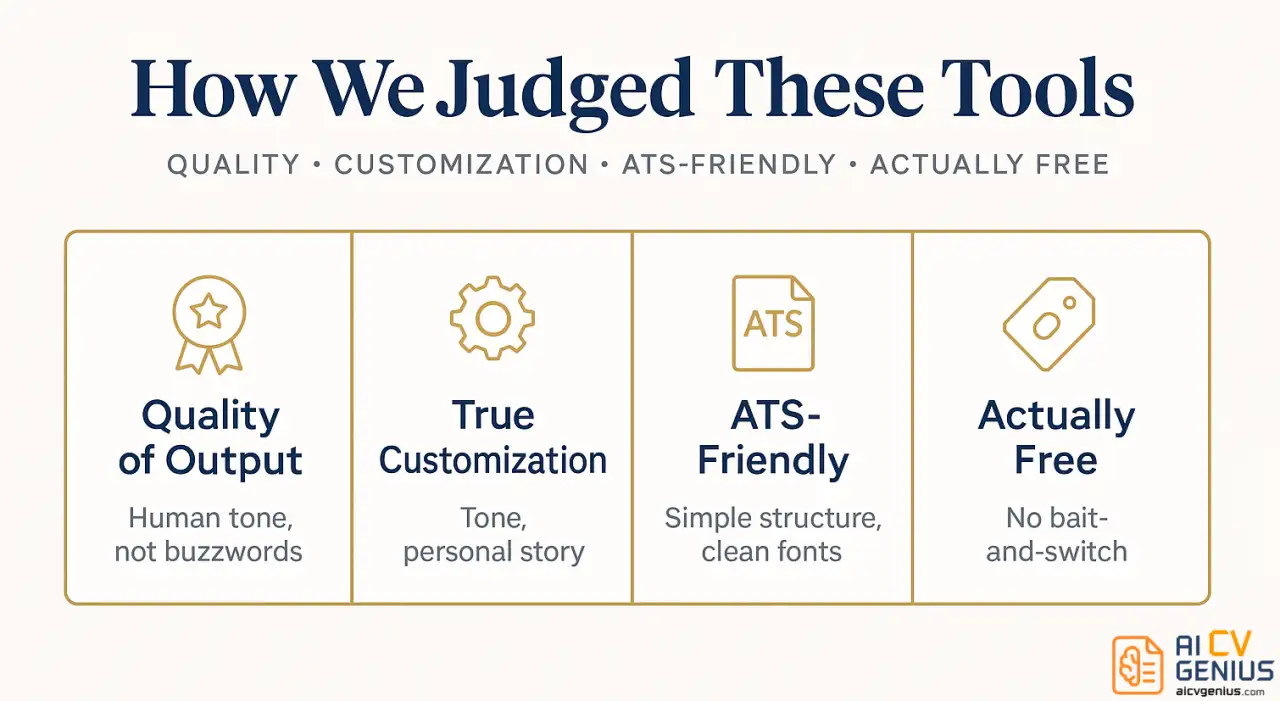
We graded each tool on five criteria that actually matter to a job seeker:
- 1️⃣ Quality of AI Output: Does it sound human? Does it use strong, active verbs? Or does it read like “I am writing to express my profound interest in the position, as I am confident my skills align with your synergistic goals”? (Yes, one tool actually wrote that.) We looked for nuance, tone, and the ability to avoid robotic clichés.
- 2️⃣ True Customization & Control: Can you genuinely adjust the tone (e.g., from “Formal” to “Enthusiastic”)? Can you easily add your own personal stories and metrics? Or is it just a rigid “Mad Libs” template where you fill in blanks?
- 3️⃣ ATS-Friendly Formatting: Does the final downloaded file (PDF or .docx) pass an ATS-parser test? We ran the outputs through a scanner to see if it choked on weird fonts, hidden tables, or headers/footers. A pretty letter that’s unreadable by a robot is useless.
- 4️⃣ The “Truly Free” Test: We graded them on their “bait-and-switch” factor. Can you actually get a usable cover letter for free? Or does it let you write the whole thing and then hit you with a “Download for $29.99” paywall?
- 5️⃣ Ease of Use: How fast could we go from blank page to finished draft? Was the interface clean or cluttered with ads and upsells?
The results were fascinating. The most expensive tools were not always the best. And two tools that looked identical on the surface produced wildly different results. Here are the five that truly stood out from the crowd.
The Top 5 Free Cover Letter Generators of 2026
These five tools stood out because they successfully balance AI sophistication with a user-friendly interface. None are a “one-click” magic button – and you should be suspicious of any tool that claims to be. But they will get you 80% of the way to a high-quality letter, and that final 20% of human polish is what makes all the difference.
1. Kickresume AI Cover Letter Writer
Best for: People who want GPT-4 quality without the ChatGPT learning curve.
Kickresume’s secret weapon is simple: it uses GPT-4, the most advanced AI language model widely available. While many competitors are still on the cheaper, faster, but less nuanced GPT-3.5, the difference in output is immediately obvious. The sentence flow is more natural, the vocabulary choices are better, and it’s far less likely to spit out a cliché.
When we tested it with our “Marketing Manager” role, it produced this gem: “I’ve spent the last five years building content strategies that don’t just chase clicks – they convert readers into customers. At my current role at [Company], I led a campaign that grew our inbound pipeline by 40% in six months by focusing on value, not just volume.”
That’s good. It’s active. It’s metrics-driven. It’s not Hemingway, but it’s a first draft that’s 90% of the way there.
What We Liked:
- ✅ AI Quality: Genuinely a step above most competitors. It “thinks” more like a writer.
- ✅ Resume Integration: If you build your resume on their platform, the AI will pull your skills and experience directly from it, making the letter highly relevant.
- ✅ Clean Templates: The final designs look modern, professional, and are fully ATS-compatible. No weird formatting.
The Catch (The “Free” Test): The free version is limited. You only get one free AI-generated cover letter. That’s it. After that, you’re on your own, or you have to upgrade. This makes it a “one-shot” tool for free users. If you’re applying to 20 jobs, you’ll need to manually copy and tweak that first draft for every subsequent application.
Verdict: This is our top pick if your goal is to create one extremely strong, high-quality “master” template that you can then adapt yourself. If you only need help with a single, crucial application, this is your best shot. For serial applicants, check out option #2.
2. Enhancv Cover Letter Generator
Best for: Fast customization and matching your resume style.
Enhancv’s generator surprised us. It isn’t the most feature-packed, but it does one thing really well: it’s a seamless part of a larger resume-building ecosystem. If you’re also building your resume with Enhancv, you can create a cover letter that perfectly matches the font, color, and header design. This visual consistency makes your application look incredibly polished and deliberate.
The AI is also very strong. When we fed it our “Career Changer” scenario (teacher to corporate trainer), it didn’t just list “teaching skills.” It wrote: “While my resume shows eight years of developing curriculum for a high-school audience, the core of my work has always been instructional design and audience engagement. I’m adept at taking complex information – whether it’s Shakespeare or a new software – and making it accessible and engaging for a diverse group of learners.” That’s exactly the “translation” a career-changer needs.
What We Liked:
- ✅ Truly Free: This is a huge win. The cover letter generator is completely free with no trials, paywalls, or “bait-and-switch” tactics. You can make and download as many as you want.
- ✅ Visual Consistency: The #1 reason to use it. A matching resume and cover letter makes you look like a top-tier candidate who cares about branding.
- ✅ Good AI: The AI is strong at analyzing the job description against your resume and finding the relevant connections.
The Catch: The AI can be a bit… enthusiastic. It loves exclamation points and adjectives like “thrilled,” “passionate,” and “incredibly excited.” You’ll need to do a “tone edit” to dial back the energy by about 20% if you’re applying for a role in, say, finance or law.
Verdict: A solid all-rounder and our top “truly free” pick. It’s the perfect choice if you’re creating your resume and cover letter at the same time and want a polished, visually consistent application package.
3. Zety Cover Letter Builder
Best for: People who like templates and a guided, “Mad Libs” style process.
Zety isn’t a “one-click” AI generator. It’s a “builder.” It walks you through the process step-by-step, asking you questions and then offering pre-written, AI-suggested phrases you can plug in. For example, it will say “Now, let’s talk about a key accomplishment” and then offer five different ways to phrase it (e.g., “In my previous role, I was responsible for…” or “A key achievement I’m proud of is…”).
This approach works surprisingly well because it forces you, the user, to think about what you actually want to say, but it removes the “blank page” anxiety. It’s less “AI writes it for you” and more “AI helps you write it yourself.”
What We Liked:
- ✅ Guided Prompts: It’s like having a coach walk you through the letter, section by section. Great for beginners.
- ✅ Pre-written Content: The library of suggested phrases is massive and organized by industry and skill.
- ✅ Real-time Checker: It flags weak sections, passive voice, or areas that need more detail.
The Catch (The “Free” Test): This is the worst offender for the “bait-and-switch.” It is not free. It lets you build the entire letter, edit it, and perfect it. Then, when you click “Download,” it hits you with a subscription paywall (e.g., a $2.70 14-day trial that auto-renews at a high monthly rate). You can, however, manually copy and paste all the text you created into a separate Word document. It’s annoying, but it’s a workaround.
Verdict: The process is excellent for people who want more control but still need prompts. The business model is frustrating. Use it if you’re willing to do the manual copy-paste workaround to avoid paying.
4. Grammarly AI Cover Letter Generator
Best for: Grammar perfectionists, career changers, and non-native English speakers.
Grammarly’s generator is a newer feature, but it’s built on their world-class language engine. The letters it produces are, unsurprisingly, grammatically flawless, clean, and professional. Where it truly shines is in handling complex scenarios. We gave it our “Career Changer” prompt, and it was the best at framing the story logically: “My eight years as an educator were, at their core, a masterclass in user engagement and knowledge transfer. I am now eager to apply this expertise in instructional design and public speaking to the corporate training environment at [Company].”
It’s also fantastic at handling employment gaps, which it can frame as “a period of professional development and freelance consulting” without sounding defensive.
What We Liked:
- ✅ Completely Free: If you have a Grammarly account (even free), the generative AI features are included. No strings attached.
- ✅ Best-in-Class Editing: It’s not just a generator; it’s an editor. After it writes the draft, you can use all of Grammarly’s powerful tools to check for tone, clarity, and conciseness.
- ✅ Great for Complex Narratives: It’s the best tool for “explaining” a career gap or a major pivot.
The Catch: It requires more “prompt engineering.” You can’t just click a button. You need to provide it with good, detailed context. It won’t just guess what you want to say. The better your input prompt, the better its output. For example, you need to write: “Generate a cover letter for a project manager role, highlighting my 5 years of experience in agile, my PMP certification, and my key achievement of delivering a $1M project on time.”
Verdict: The “thinking person’s” generator. If you’re changing careers or have a complicated work history, this tool will help you frame your story perfectly. If you just want a simple letter for a simple job, it might feel like overkill.
5. Freesumes Cover Letter Generator
Best for: No-signup, no-BS, fast-volume applications.
Freesumes wins the simplicity and privacy award. No account required. No email verification. You land on the page, pick one of six clean templates, fill in some basic info, and it generates a letter. You can then download it as a PDF. The entire process takes less than two minutes.
The AI isn’t as sophisticated as Kickresume or Grammarly. The content is… basic. For our “Registered Nurse” prompt, it wrote: “I am a dedicated and compassionate Registered Nurse with experience in fast-paced environments. I am proficient in patient care and electronic medical records.” It’s not going to win any awards, but it’s not wrong.
What We Liked:
- ✅ Zero Friction: This is the best free cover letter builder no signup we found. Period.
- ✅ Truly Free: No paywalls, no trials, no tricks.
- ✅ Professional Templates: The six templates are simple, clean, and don’t look outdated.
- ✅ Privacy-Focused: It doesn’t save your data after you close the tab.
The Catch: The AI content is very generic. Think of it as a starter draft that you must personalize heavily. Do not send the generated letter as-is unless you are applying to 50 jobs and just playing the numbers game.
Verdict: Perfect for the fast-moving job hunter who needs volume over perfection. It’s a fantastic tool for getting a structure down on paper in 90 seconds, which you can then spend 10 minutes humanizing. Not ideal if you’re going after one or two highly competitive “dream jobs.”
Quick Comparison: Which Tool Fits Your Needs?
Still not sure which tool to try first? Here’s a side-by-side look at what each one offers. This table summarizes our findings for a quick decision.
| Tool | AI Quality | Truly Free? | Best For |
|---|---|---|---|
| Kickresume | Excellent (GPT-4) | 1 free letter (The “One-Shot”) | A single, high-quality “master” draft |
| Enhancv | Good | Yes (Completely Free) | Visual consistency with your resume |
| Zety | Good | No (Paywall to download) | The guided, step-by-step writing process |
| Grammarly | Very Good | Yes (Completely Free) | Career changers & non-native speakers |
| Freesumes | Basic | Yes (Completely Free, No Signup) | Fast, high-volume applications |
If you’re applying to one dream job, use Kickresume to get the best AI-first draft. If you need to create 10 letters this week, Enhancv or Freesumes will save you the most time and cost you nothing.
The Number One Risk: Sounding Like a Robot
Here’s the hard truth, and it’s worth repeating: hiring managers have seen thousands of AI-generated cover letters by now. They are becoming experts at spotting them. The giveaways are always the same: a total lack of personality, overly formal or complex words, and a laundry list of “skills” with zero “stories.”
AI loves to write: “I am excited to leverage my robust skill set in dynamic-problem solving to unlock transformative outcomes for your esteemed organization.”
A human writes: “I love solving tricky problems. At my last job, our checkout page was failing 10% of the time, so I dug into the code and found a bug that saved the company $20k a month.”
Which one gets the interview?
When we showed a recruiter friend (who screens 100+ applications a day) three cover letters – one written by a person, two by AI – she identified the AI ones in under 10 seconds. Her tip? “Real humans tell stories. Robots list accomplishments.”
So even if you use the best free ai cover letter generator 2026, you cannot just click “generate” and “send.” That is a fast-track to the “no” pile. You MUST use the AI as a co-pilot, not an auto-pilot. You must:
- ✅ Inject Personality: Replace corporate jargon (“leverage,” “synergy,” “utilize”) with plain English (“use,” “teamwork,” “use”).
- ✅ Add One Specific, Human Story: Add one anecdote. A short, 2-sentence story about a specific time you solved a specific problem. This is your “human” fingerprint.
- ✅ Cut Every Cliché: Delete any sentence that sounds like it came from a business textbook. “Results-driven professional,” “passion for excellence,” “team player” – all gone.
- ✅ Read It Out Loud: This is the most important test. If you stumble over a sentence, or if you wouldn’t say it in a real interview, rewrite it until it sounds like you.
Think of these tools as first-draft machines. They handle the hard part – structure, formatting, beating writer’s block. You handle the human part – personality, specificity, and making it sound like you actually want the job.
Want more strategies for making your application stand out? Check out our guide on cover letter tips that actually work.
How to Use These Tools Without Getting Caught: The 5-Minute “Humanizer” Workflow
Using an AI generator isn’t “cheating.” It’s smart. It’s resourcefulness. But only if you use it correctly. Here is our battle-tested, 5-minute process for turning a robotic AI draft into something genuinely hireable.
Minute 0-1: The Generation
Pick one of the five tools above. Feed it the job title, the company name, and paste in 2-3 of your top achievements from your resume. Do not just feed it the job title alone. The better your input, the better the output. Garbage in, garbage out. Generate the draft.
Minute 2: The “Jargon Purge”
Quickly read the draft and delete every single corporate cliché. Use Ctrl+F to find and destroy words like:
- Leverage
- Synergy
- Results-driven
- Passionate
- Utilize
- Esteemed organization
Replace them with simple, human words. “Use” instead of “utilize.” “Excited about” instead of “passionate.” “Your company” instead of “esteemed organization.”
Minute 3: The “Proof” Paragraph
Find the generic middle paragraph – the one that lists your skills. Delete it. Replace it with one short, specific story. Use the “STAR” method (Situation, Task, Action, Result).
Example: “My real strength is in clarifying complex problems. For example, at my last role, our user churn was high. I dove into the data and found the drop-off point was our confusing settings page. I redesigned it over a weekend, and we saw a 15% drop in churn the next month. I’d love to bring that same proactive, data-driven approach to your team.”
Minute 4: The “Read Aloud” Test
Seriously. Read the entire letter out loud. Your ears will catch what your eyes miss. You’ll hear the awkward phrases, the sentences that are too long, the parts that don’t sound like you. Fix them. Make it conversational.
Minute 5: The Final ATS Check
Is it a free cover letter generator ats-friendly tool? Even if it is, do a final check. No weird fonts. No tables. No headers or footers with your contact info (this is a classic mistake – put your contact info in the main body of the text, as some ATS scanners ignore headers). Keep it simple: standard fonts (Arial, Calibri, Times New Roman), left-aligned text, and save as a .docx or PDF.
Tools We Tested But Didn’t Recommend (The “Hall of Shame”)
For transparency, here are the tools that didn’t make the cut and the specific reasons why. We don’t recommend wasting your time with these.
- ⛔ Resume.io: The AI output was bizarrely formal, stiff, and repetitive. Every single paragraph started with “I am…” or “I have…” It felt like reading the same sentence five times. It lacked any flow and was impossible to personalize.
- ⛔ Canva Cover Letter Maker: We love Canva for design, but their AI is an afterthought. It’s basically just a text editor with a generic ChatGPT wrapper bolted on. The AI suggestions were so generic (“I am a hard worker”) they were useless. You’re better off just using ChatGPT directly.
- ⛔ MyPerfectResume: The “bait-and-switch” champion. The free version is barely functional. It lets you see the letter, but you can’t download, copy, or print it without paying. The pricing is confusing, and it’s a “premium” product with sub-par AI.
- ⛔ Cover Letter Copilot: Overpromised and underdelivered. It claims to “intelligently analyze your LinkedIn profile” but it just scraped the basic job titles. The output was no better than typing your own (bad) prompt into ChatGPT-3.5.
- ⛔ LazyApply: The name, unfortunately, says it all. The AI-generated letters sounded lazy. They were short, generic, and full of clichés. They sounded like they were written by someone who didn’t care at all, which is the exact opposite impression you want to make.
If you’re changing careers and wondering how to position yourself, our guide on career change resumes will help you translate your old experience into your new field’s language – a task many of these failed tools couldn’t handle.
Final Verdict: Are Free Cover Letter Generators Actually Good?
The short answer: are free cover letter generators good? Yes – but only if you use them as a tool, not as a crutch. They are a starting block, not a self-driving car.
Here’s the final, honest breakdown of what they are good for and what they simply cannot do.
What They Are Genuinely Good At:
- Breaking Writer’s Block: This is their #1 value. Staring at a blank, blinking cursor is terrifying. A generator gives you something to work with.
- Saving Time on Structure: They nail the professional format every time. You won’t forget the date, the hiring manager’s address, or the closing.
- Handling Basic Phrasing: They are great at the boring parts – “I am writing to apply for…” or “Thank you for your consideration…”
- Ensuring ATS-Friendly Formatting: The good ones create clean, single-column .docx or PDF files that robots can read without errors.
What They Absolutely Cannot Do (And Never Will):
- Replace Your Unique Voice: They don’t have your personality, your humor, or your unique way of phrasing things.
- Tell Your Stories: They can’t tell that specific, detailed story about how you saved a project or delighted a customer. They can only allude to it.
- Understand Nuance or Company Culture: An AI can’t tell the difference between the “funky, casual” tone of a startup and the “formal, conservative” tone of a law firm. It will often get this wrong.
- Show Genuine Enthusiasm: AI “passion” sounds fake. Real enthusiasm comes from specific, personal reasons for wanting the job, which an AI cannot know.
The best, most effective approach? Use a free cover letter builder no signup (like Freesumes) to create a solid first draft in five minutes, then spend 15-20 minutes “humanizing” it using our 5-minute workflow. That’s a 25-minute process that’s 10x faster than writing from scratch and 100x more effective than sending a generic, robotic AI letter.
Looking for more ways to improve your application materials? Explore our career resources hub for guides on resumes, interviews, and job search strategies.
FAQ: Your Top Questions Answered
Final Thoughts
After testing 10+ tools, our final verdict is clear. For a single, high-quality “master” letter, use Kickresume and its powerful GPT-4 AI (and be fine with its “one free shot”). For the best truly free experience with unlimited letters and great resume-matching, use Enhancv. For the fastest, no-signup-required draft, use Freesumes.
But remember: the best free cover letter generator 2026 is not a “magic button.” It’s an assistant. It’s a tool. It’s the thing that gets you from a blank page to a “B-” draft in two minutes. Your job is to take that “B-” draft and, with 15 minutes of human-centric editing, polish it into an “A+” letter that no robot could ever write.
Don’t send AI letters as-is. Add your voice. Tell your story. Cut the corporate speak. Make it sound like a human who actually wants the job wrote it – because that human is you.
</And if you’re struggling with more than just your cover letter, it might be time to revisit your whole application strategy. Start by checking out our guide on how to improve your CV so your resume and cover letter work together to tell a compelling, consistent story.
Ready to write a cover letter that actually gets read? Pick one of these five tools, follow our 5-minute “Humanizer” workflow, and send something you’re proud of. The job market is tough enough – at least make your cover letter work for you instead of against you.