
- Core framing: An IT support resume should read like a diagnostic log that proves you restore order under pressure, not a tool list.
- What hiring managers scan for: Prioritization, clear communication, documentation that prevents repeat issues, and match to their stack (AD, Microsoft 365 or Azure, ServiceNow or Zendesk, DNS, DHCP).
- ATS basics: Use a clean one-column layout, standard headings, and mirror job-description keywords. Avoid graphics, skill bars, and complex formatting.
- Structure that works: Strong header and title, a tight 3 to 4 line summary with one metric, and technical skills grouped by layers (OS, hardware, networking, services, ticketing).
- Experience rules: Write achievements as Action + Result with proof (Ticket volume, CSAT, FCR, resolution time, uptime, knowledge base impact, deployments, automation), and tailor emphasis by tier and role.
In a world run by technology, the most valuable professionals are not just those who build it, but those who keep it running. An IT support resume is more than a list of software you know; it’s a diagnostic report of your ability to restore order from chaos. It is your first ticket, and it needs to be resolved with precision.
Hiring managers are not just looking for a “tech person.” They are looking for a problem-solver, a translator, and a calm voice in a storm. They need someone who can speak “human” to a frustrated user and “tech” to a network engineer, often in the same breath. Most IT resumes fail because they list what they know (e.g., “Active Directory”) but never prove how they use it to help the business (e.g., “Reduced new user onboarding time by 30% by streamlining Active Directory provisioning”).
This guide will deconstruct the IT support role from the hiring manager’s perspective. We will move beyond just listing tools and certifications. We will build a resume that showcases your technical acumen, your communication skills, and your unique value in a way that is structured, logical, and impossible to ignore. Let’s build your case.
The Recruiter’s View: What Managers Want & How to Pass the ATS Firewall
When an IT manager scans your resume, they are not just filling a seat. They are looking for a deputy who can reduce their own workload and protect the company’s productivity. In their 7-second scan, they are running a mental diagnostic.
They are subconsciously asking:
- 1. Can You Triage? Do you know the difference between a P1 critical outage and a P4 cosmetic bug? They are looking for signals that you can prioritize under pressure.
- 2. Can You Translate? Can you explain to a non-technical CEO why their email isn’t working without using the word “SMTP”? They need a communicator, not just a technician.
- 3. Are You Proactive or Reactive? Do you just fix the same problem 10 times, or do you fix it once and then write the Knowledge Base (KB) article so it never becomes a ticket again? They want people who reduce tickets, not just close them.
- 4. Do You Have the “Stack”? Do you know their core environment? Listing Active Directory, Microsoft 365/Azure, Okta, Zendesk/ServiceNow, and key networking protocols (TCP/IP, DNS, DHCP) is crucial.
Before any human sees your resume, the Applicant Tracking System (ATS) must parse it. This software is your first technical challenge. It’s a simple filter that scans for keywords and structure. A single, clean column is the safest format, as two columns can jumble your text. To pass, you must mirror keywords from the job description (“Windows Server,” “PowerShell,” “ITIL framework”), avoid graphics or skill bars, and use standard headings like “Professional Experience” and “Technical Skills.”
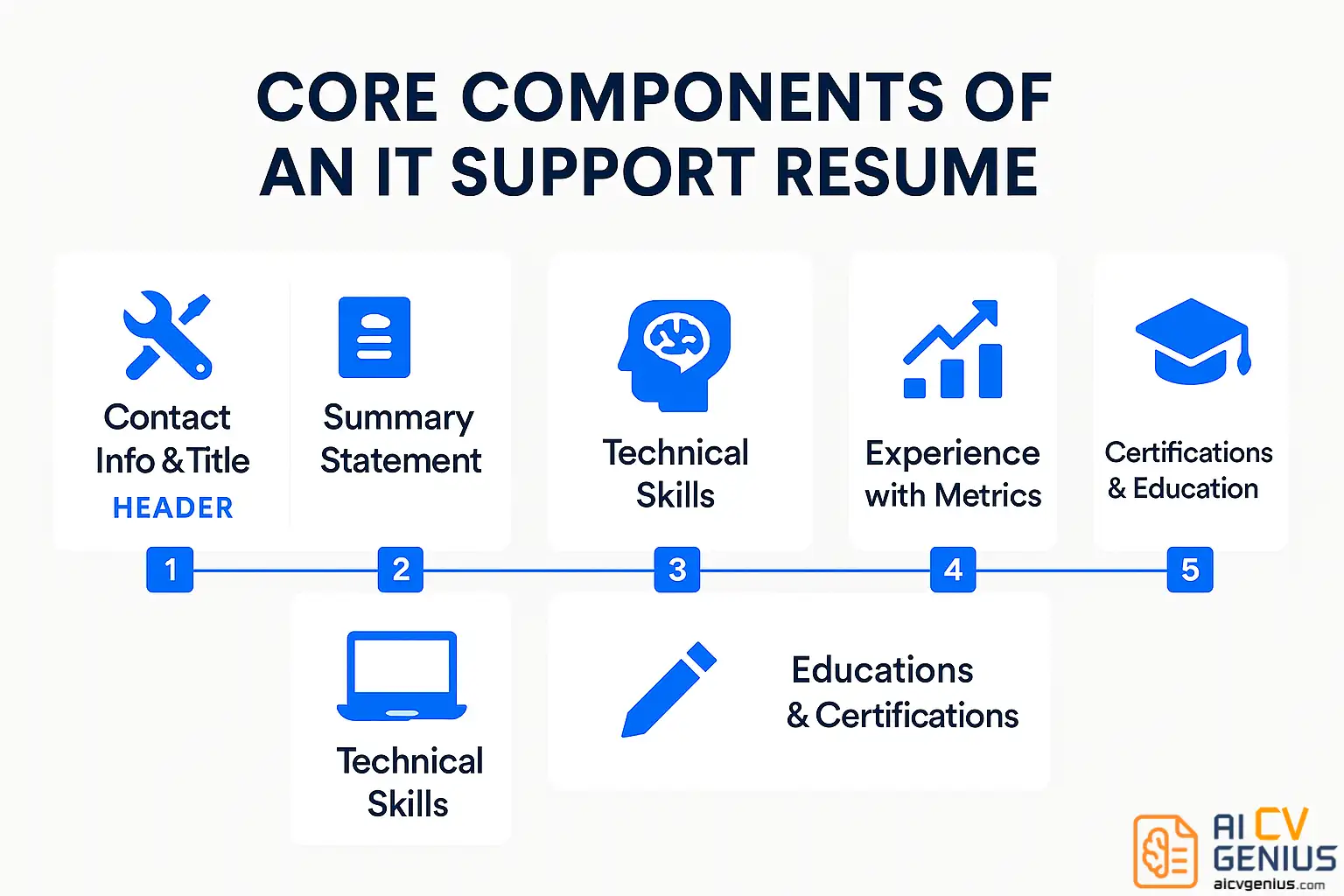
Structure: Build Your Resume Like a System Diagram
A good IT system is logical, hierarchical, and easy to navigate. Your resume must be the same. Guide the reader’s eye from the most critical information down to the supporting details.
1. Header: The Root Directory
Make it clean and professional. This is not the place for creativity.
Your Name | Professional Title (e.g., “IT Support Specialist,” “Help Desk Analyst,” “Systems Administrator”) | City, State, Zip | Phone | Email | LinkedIn URL (Customized, not the default numbers) | GitHub/Portfolio Link (Optional, but powerful if you have automation scripts or a home lab to show).
2. Professional Summary: The README File
This is your “executive summary.” In 3-4 lines, it summarizes your entire value proposition for the hiring manager. It must be dense with your most relevant skills and a key metric.
Weak Summary:
“IT professional with 5 years of experience. Good at troubleshooting and working with users. Looking for a challenging new role.” (This is generic and passive).
Strong Summary (Tier 1-2):
“Tier 2 IT Support Specialist with 4+ years of experience in fast-paced enterprise environments. Proven ability to resolve complex hardware, software, and network issues, maintaining a 98% user satisfaction rating. Expert in ServiceNow, Active Directory, and M365 administration.”
Strong Summary (Career Changer):
“Detail-oriented professional transitioning into IT support, leveraging 3 years of experience in customer service and problem-solving. Recently CompTIA A+ certified, with hands-on experience in hardware troubleshooting, network basics, and Active Directory from a home lab environment.”
3. Technical Skills: The Tech Stack
This is the most-scanned section of your resume. Do not just list everything you’ve ever touched. Group your skills logically. This shows you are organized and understand the different layers of IT.
| Operating Systems | Windows 10/11, Windows Server 2019/2022, macOS, Linux (Ubuntu, RHEL) |
| Hardware | PC/Mac Troubleshooting, Laptop Imaging, Printers, Peripherals, Mobile Devices (MDM) |
| Networking | TCP/IP, DNS, DHCP, VPN (Cisco AnyConnect), LAN/WAN, Wi-Fi Troubleshooting |
| Software & Services | Active Directory, Microsoft 365 Admin, Azure AD, VMware, PowerShell (Basic Scripting) |
| Ticketing & Tools | ServiceNow, Zendesk, JIRA, Confluence, SCCM/Intune, Okta, Jamf |
4. Experience: The Log Files (Your Proof)
This is the core of your resume. Each bullet point must be an achievement, not a job duty. Use the “Action Verb + Project + Metric” formula. Prove your impact.
| ❌ Weak Bullet (Duty) | ✅ Strong Bullet (Impact) |
|---|---|
| “Responsible for answering help desk calls and emails.” | “Managed 40+ daily tickets via phone and email, achieving a 95% first-contact resolution (FCR) rate for Tier 1 issues.” |
| “Handled new user setups.” | “Onboarded 150+ new hires, provisioning accounts in Active Directory and M365, and configuring hardware, resulting in a 99% ‘Day 1 readiness’ score.” |
| “Fixed computer problems.” | “Authored 10+ Knowledge Base articles for common issues (e.g., VPN setup, password resets), reducing ticket volume for those topics by 30%.” |
More High-Impact Examples:
- ✅ Acted as the primary escalation point for 3 junior technicians, providing mentorship and resolving complex Tier 2/3 issues.
- ✅ Maintained 99.9% uptime for critical network infrastructure by proactively monitoring and applying patches.
- ✅ Deployed and imaged 300+ laptops for a company-wide hardware refresh using SCCM/Intune, finishing the project 2 weeks ahead of schedule.
- ✅ Wrote a PowerShell script to automate the new user creation process, saving an estimated 5 hours of manual work per week.
5. Certifications & Education
In IT, certifications are often more important than your degree. They are standardized proof of your knowledge. List them prominently, often even before your education.
- CompTIA A+ (Essential for help desk)
- CompTIA Network+ (Shows networking foundation)
- CompTIA Security+ (Critical for any role)
- Google IT Support Professional Certificate (Great for entry-level)
- ITIL Foundation (Shows you understand process)
- Microsoft Certified: Azure Fundamentals (AZ-900)
- (Your Degree, Your University, City, State)
The Complete IT Support Resume Example (Putting It All Together)
Theory is one thing; practice is another. Let’s apply every strategy we’ve discussed to build a complete resume for a fictional candidate, Alex Chen, a Tier 2 IT Support Specialist.
ALEX CHEN
IT Support Specialist | CompTIA A+ & Network+
Austin, TX 78701 | (555) 123-4567 | alex.chen.it@email.com | linkedin.com/in/alexchenit
PROFESSIONAL SUMMARY
Tier 2 IT Support Specialist with 4+ years of experience in fast-paced, 500+ user enterprise environments. Proven ability to resolve complex hardware, software, and network issues, maintaining a 98% user satisfaction (CSAT) rating. Expert in ServiceNow, Active Directory administration, and M365, with a proactive focus on reducing recurring tickets by authoring clear Knowledge Base articles.
TECHNICAL SKILLS
|
|
PROFESSIONAL EXPERIENCE
IT Support Specialist (Tier 2) | TechCorp Solutions | Austin, TX (2020 – Present)
- Provide Tier 1-2 support for 500+ end-users, managing 30+ daily tickets in ServiceNow and achieving a 95% first-contact resolution (FCR) rate.
- Onboarded 150+ new hires, provisioning accounts in Active Directory and M365, and configuring hardware, resulting in a 99% ‘Day 1 readiness’ score.
- Authored 12 Knowledge Base articles for common issues (e.g., VPN setup, multi-factor authentication), reducing ticket volume for those topics by 30%.
- Deployed and imaged 300+ laptops for a company-wide hardware refresh using SCCM/Intune, finishing the project 2 weeks ahead of schedule.
Help Desk Analyst (Tier 1) | CompuServices | Austin, TX (2018 – 2020)
- Acted as the first point of contact for all IT issues, resolving password resets, software installs, and printer issues for 200+ users.
- Maintained a 98% user satisfaction (CSAT) rating over 2 years by providing clear, patient, and effective technical communication.
- Managed hardware asset inventory, tracking 500+ devices and ensuring all equipment was properly logged and maintained.
CERTIFICATIONS & EDUCATION
- CompTIA Network+ (2021)
- CompTIA A+ (2018)
- ITIL Foundation Certificate in IT Service Management (2020)
- Bachelor of Science in Information Technology | University of Texas at Austin (2018)
PROJECTS (HOME LAB)
- Configured a home network with a pfSense firewall to segment traffic and deployed a Proxmox server to run VMs for Pi-hole (ad blocking) and a Plex media server.
- Set up a Windows Server 2019 VM to practice Active Directory, GPO, and DNS/DHCP configuration.
Advanced Strategies: Metrics, Tailoring, and Common Mistakes
Quantify Your Impact: How to Add Metrics to a Support Resume
This is what separates junior candidates from senior professionals. Numbers prove your value. You have more data than you think. Look for it.
Metrics to Use:
- Volume (The “How Many”): “Supported 300+ users across 5 office locations.” or “Managed 50+ tickets per day.”
- Quality (The “How Well”): “Maintained a 98% user satisfaction (CSAT) score.” or “Achieved a 95% First-Contact Resolution (FCR) rate.”
- Efficiency (The “How Fast”): “Reduced average ticket resolution time by 20%.” or “Automated a process, saving 10 hours of manual work per week.”
- Initiative (The “What You Built”): “Authored 15 KB articles, reducing repeat tickets by 25%.”
If you don’t have exact numbers, estimate. “Resolved approx. 30-40 tickets daily” is still more powerful than “Resolved tickets.”
Tailor Your Resume for Different IT Roles
“IT Support” is a wide field. Your resume must be tailored to the specific role. A Help Desk resume looks different from a Network Support resume.
| Role | Focus Area | Resume Emphasis & Keywords |
|---|---|---|
| Help Desk Support (Tier 1) | User interaction, software issues, password resets. | Emphasize: CSAT Score, FCR, Ticket Volume, Communication, ServiceNow/Zendesk, Active Directory. |
| Desktop Support (Tier 2) | Hardware, imaging, installation, in-person support. | Emphasize: Hardware Troubleshooting, SCCM/Intune, Laptop Imaging, Asset Management. |
| Network Support | Connectivity, routers, switches, firewalls. | Emphasize: TCP/IP, DNS, DHCP, VPN, Cisco, Network+, CCNA, Uptime %. |
| Systems Administrator | Servers, automation, infrastructure. | Emphasize: Windows Server, Linux, Azure/AWS, VMware, PowerShell, Automation, Uptime %. |
Common Mistakes to Avoid (The Corrupted Files)
- ❌ Listing “Soft Skills”: Don’t list “Problem-Solving” or “Communication” in your skills section. Prove them in your bullet points. (e.g., “Communicated complex technical issues to 100+ non-technical users.”)
- ❌ A “Wall of Text”: Use white space. An IT resume should be clean, logical, and easy to scan. If it’s cluttered, it implies your mind is, too.
- ❌ Typos and Errors: In IT, attention to detail is everything. A typo on a resume is like a syntax error in a script. It’s a critical failure.
- ❌ Outdated Tech: Remove Windows 7, Windows XP, or very old software unless the job specifically asks for it (e.g., supporting legacy systems).
Pros & Cons of Using a Resume Template
| Pros | Cons |
|---|---|
| ✅ Ensures a clean, professional, and ATS-friendly layout. | ❌ Can look generic if you don’t personalize the content. |
| ✅ Saves significant time on formatting. | ❌ Many “creative” templates are ATS-incompatible. |
| ✅ Provides a logical hierarchy that recruiters expect. | ❌ Might limit flexibility for highly specialized technical projects. |
You can find clean, ATS-optimized templates at Resume Templates Finder. They are built for clarity and scanning.
FAQs & Final Thoughts
In-Depth FAQs for an IT Support Resume
Weak: “Good communication skills.”
Strong: “Translated complex technical requirements from engineers into clear action plans for non-technical sales staff.”
Final Thoughts: Your Resume is Your First Ticket
Your IT support resume should function just like your favorite script: it’s clean, efficient, automated to show your best features, and free of bugs. Every section should prove that you don’t just fix problems – you prevent them. You don’t just close tickets – you communicate solutions. Recruiters aren’t just hiring a troubleshooter; they’re hiring peace of mind for the entire company.
Explore professional layouts at Resume Templates Finder or read more in-depth guides at Career Resources to keep your career systems running smoothly.