
- Core idea: Your job application email is the first impression and often decides if the resume gets opened.
- Inbox reality: Recruiters scan in seconds and delete fast when they see vague subjects, walls of text, typos, or sloppy signals.
- Non negotiables: Use a professional email address, a clear searchable subject line, and correct PDF attachments with clean file names.
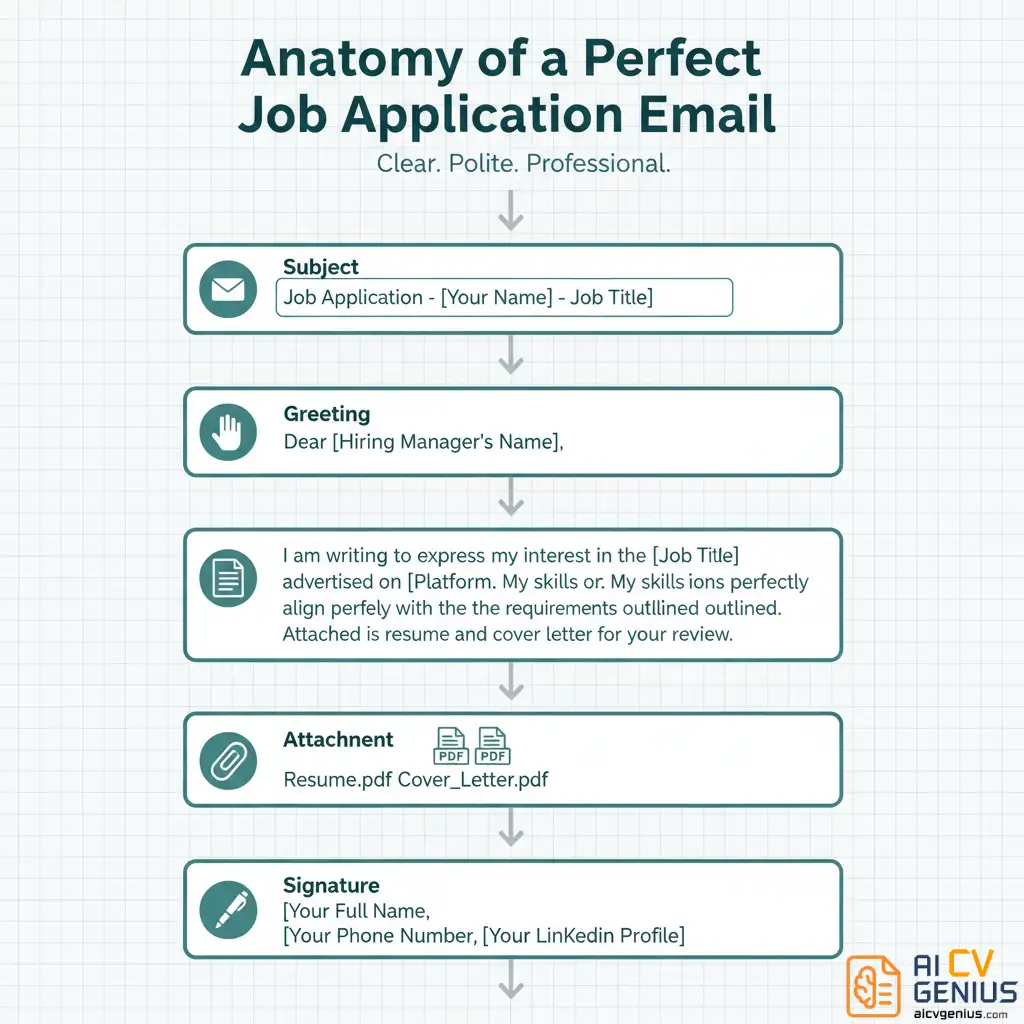
- Email structure: Greeting, Purpose line, One sentence tailored pitch, Polite close with attachments, Professional signature.
- Execution rules: Send during business hours, follow up once after 5 to 7 business days, and run a final checklist before sending.
The Digital Handshake: Why Your Job Application Email Is the Real First Impression
We spend hours polishing every bullet point on our resume, debating fonts, and perfecting margins. Then, we attach that masterpiece to a 30-second, sloppily written email and hit “send.” This is a critical, and incredibly common, mistake. The job application email is not just a delivery mechanism; it is the envelope. It is the handshake before the conversation. It is the first test of your professionalism, and it often determines if your resume gets opened at all.
I’ve seen thousands of applications in a hiring capacity. The ones that get an immediate, positive response are not the ones with the flashiest resumes. They are the ones that arrive in an email that is clear, respectful, professional, and easy for the recruiter to process. It instantly signals, “This person is organized and considerate.”
Think of your email as the trailer for your movie (your resume). If the trailer is confusing, boring, or unprofessional, why would anyone buy a ticket? This guide will break down the psychology, strategy, and structure behind the email that gets you noticed for the right reasons.
“Your resume shows your experience. Your email shows your professionalism.”
The Psychology of the Hiring Manager’s Inbox: What They Really See
A hiring manager’s inbox is a battlefield. It is filled with hundreds of unread messages, internal requests, and a flood of applications. When your email appears, it is judged in less than three seconds. In that instant, they are not reading your words; they are pattern-matching. They are looking for reasons to delete, not to read.
Your email provides subconscious clues:
- An Unprofessional Email Address (e.g., partyguy99@domain.com): Signals immaturity. Delete.
- A Vague or Empty Subject Line (e.g., “Job” or “My Resume”): Signals laziness and creates work for them. Delete.
- A Wall of Text: Signals poor communication skills and a lack of respect for their time. Delete.
- Typos and Bad Grammar: Signals a critical lack of attention to detail. Delete.
The perfect job application email is designed to survive this 3-second test. It is clean, scannable, and immediately tells the recruiter: “This is the application for [Job Title] from [Your Name], and it is worth your time.” It calms their brain and makes opening your attachment the path of least resistance.
The Non-Negotiable Basics: Get These Right Before You Type a Word
You can write the most brilliant email body in the world, but it will not matter if you fail these fundamental checks. These are the “pass/fail” elements of your application.
1. The Professional Email Address
This is your digital name tag. It must be simple and professional. If you are still using an email from high school, it is time to create a new one exclusively for your job search.
- ✅ Good: firstname.lastname@gmail.com, f.lastname@gmail.com, j_lee_writes@gmail.com
- ❌ Bad: surferdude88@hotmail.com, sarahlovescats@yahoo.com, [any combination of numbers that is not a graduation year]
Why it matters: A professional address signals maturity and identity. A goofy address forces the recruiter’s brain to work (Who is ‘surferdude88’?) and plants a seed of doubt about your judgment.
2. The Clear, Searchable Subject Line
The subject line is your email’s title. It must be clear, specific, and searchable. A recruiter needs to be able to find your email two weeks later by searching for the job title.
Follow the instructions. If the job posting says, “Use ‘Application for Marketing Manager – [Your Name]’ in the subject,” then use exactly that. If there are no instructions, use this formula:
Subject: Application for [Job Title] – [Your Name]
- ✅ Good: Subject: Application for Project Coordinator – Jane Lee
- ✅ Good: Subject: Applying for Social Media Manager (Job ID #45-12) – J. Lee
- ❌ Bad: Subject: Hello
- ❌ Bad: Subject: My Resume
- ❌ Bad: Subject: (empty)
3. The Correct Attachments (PDF format!)
This is the cardinal sin of job applications. Forgetting the attachment is an instant disqualifier for any job that requires attention to detail. Double-check. Then triple-check.
- ✅ Always use PDF. A PDF locks your formatting. A .doc or .pages file can look completely different (and terrible) on the recruiter’s computer. A PDF is a universal sign of professionalism.
- ✅ Name your file clearly. Do not send resume_final_v3_draft.pdf. This looks disorganized.
- Good: Jane_Lee_Resume.pdf
- Good: Lee, Jane – Resume 2026.pdf
- Good: Jane_Lee_Cover_Letter.pdf
- ✅ Do not use .zip files. Many corporate servers block them as a security risk. Attach your PDF files directly.
- ✅ Do not paste your resume into the email body. It ruins all formatting and shows a deep misunderstanding of professional norms.
The 5-Part Structure That Always Works
Your email body should be concise, professional, and personalized. It should take less than 30 seconds to read. This is not your cover letter. It is the introduction to your cover letter and resume.
Use this five-part framework for a perfect, scannable email.
Part 1: The Greeting
Address a specific person if you can. “Dear Hiring Team” is a last resort.
- Best: “Dear Ms. Patel,” (Use “Ms.” or “Mr.” unless their LinkedIn profile or the company culture is clearly informal.)
- Good: “Dear [First Name Last Name],” (e.g., “Dear Jane Doe,”)
- Acceptable: “Dear [Job Title] Hiring Team,” (e.g., “Dear Marketing Manager Hiring Team,”)
- Avoid: “To Whom It May Concern,” or “Dear Sir/Madam.” These are dated and feel impersonal.
Part 2: The Opening Line (Context)
Immediately state your purpose. Do not bury the lede.
“I am writing to apply for the [Job Title] position I found on [Platform, e.g., LinkedIn, your careers page].”
If you were referred, state it here. This is your most powerful asset.
“I am writing to apply for the [Job Title] position. My colleague, [Colleague’s Name], recommended I reach out.”
Part 3: The Body (Your 1-Sentence Pitch)
This is where you add a single sentence of personalization. This shows you have read the job description. Pick one key requirement from the job ad and connect it to your main strength.
- Example 1: “I was drawn to this role because of its focus on data-driven storytelling, which has been the core of my work for the past three years.”
- Example 2: “My experience in managing cross-functional creative projects aligns directly with the needs you’ve outlined for this position.”
This one sentence separates you from the 90% of applicants who send a generic, “Please see my resume.”
Part 4: The Closing (Call to Action)
Be polite, confident, and clear about your attachments.
“I have attached my resume and cover letter for your review. I am very interested in this opportunity and look forward to discussing how my skills could benefit the [Company Name] team.”
Avoid weak or demanding language:
- ❌ Weak: “I hope you’ll consider me.” or “I know I’m not the perfect fit, but…”
- ❌ Demanding: “Please let me know when we can schedule an interview.”
Part 5: The Sign-Off and Signature
Keep the sign-off professional. Then, include a simple, clean email signature.
- Professional Sign-Offs: “Sincerely,” “Best regards,” “Warm regards,” “All the best,”
- Avoid: “Cheers,” “Thanks!” “Best,” (too informal) or “Respectfully yours” (too formal).
Your signature block should be simple:
Best regards,
Jane Lee
[Your Phone Number] [Your LinkedIn Profile URL] [Optional: Link to your online portfolio/website]
Do not include: Your home address, a motivational quote, or a large image/logo. These just clutter the email.
Examples: Putting It All Together
Here are two clear templates. Notice how they are brief, personalized, and professional. They respect the reader’s time.
Example 1: The Standard Application (Cold Outreach)
Subject: Application for Project Coordinator – Daniel Tran
Dear Mr. Chen,
I am writing to apply for the Project Coordinator position at [Company Name], which I discovered on LinkedIn.
My experience in managing client communications and scheduling for multiple agile projects aligns well with the responsibilities you described. In my previous role at BrightTech, I helped streamline our project tracking, which led to a 15% improvement in on-time delivery.
I have attached my resume and cover letter for your review. I am very excited about this opportunity and look forward to hearing from you.
Best regards,
Daniel Tran
(555) 123-4567
linkedin.com/in/danieltran
Example 2: The Referral (Warm Outreach)
Subject: Referral from Alex Nguyen for Graphic Designer Role – Jane Lee
Dear Ms. Patel,
I am writing to apply for the Graphic Designer position at [Company Name]. My former colleague, Alex Nguyen, recommended I contact you directly about this opening.
Alex and I worked together at BrightTech, where I led the re-design of our main product’s UI/UX. He felt my skills in [Specific Skill, e.g., mobile-first design] would be a great match for your team.
I have attached my resume and portfolio for your consideration. I am very enthusiastic about the work [Company Name] is doing and would welcome the chance to discuss this role further.
Sincerely,
Jane Lee
(555) 789-0123
janeleeportfolio.com
linkedin.com/in/janelee
When to Send and How to Follow Up
When to Send: The best time to send a job application email is during business hours. Aim for Tuesday through Thursday, between 9:00 AM and 11:00 AM. Mondays are for catching up, and Fridays are for wrapping up. Sending it during prime business hours increases the chance it will be seen at the top of the inbox.
How to Follow Up: If you do not hear back within the timeframe they gave you (or after 5-7 business days if no timeline was given), it is appropriate to send one polite follow-up. Do not send another application. Simply reply to your original sent email (so they have the context) with a simple message:
Subject: Re: Following Up – Marketing Assistant Application
Hi [Hiring Manager’s Name],
I hope your week is going well.
I wanted to politely follow up on my application for the Marketing Assistant position I sent on [Date]. I remain very interested in the opportunity to contribute to the [Company Name] team.
Please let me know if there is any additional information I can provide.
Warm regards,
Jane Lee
This is professional, polite, and non-demanding. One follow-up is enough. You can read more about tone and timing in our communication guides.
Final Checklist: Do This Before You Hit “Send”
Run through this list. Every single time. It will save you from 99% of common mistakes.
- ✅ Subject Line: Is it clear, specific, and does it include the job title?
- ✅ Recipient: Did I spell their name correctly? Am I using the correct email address?
- ✅ Attachments:
- Did I actually attach them? (Send a test email to yourself first).
- Are they in PDF format?
- Are the filenames professional (e.g., Your_Name_Resume.pdf)?
- ✅ Personalization: Did I mention the correct company name and job title? (A classic copy-paste error).
- ✅ Proofreading: Did I read the entire email (and subject line) out loud to catch typos, repeated words, or awkward phrasing?
- ✅ Signature: Is my signature block clean and does it include my LinkedIn/phone?
In-Depth FAQs: Your Toughest Email Questions
Final Thoughts: Your Email Is a Signal of Your Character
Writing a great job application email is not about complex vocabulary or sounding “smart.” It is about showing respect. It signals to a busy recruiter that you are organized, thoughtful, and have high attention to detail. You are making their job easier.
Your resume proves you have the skills. Your cover letter proves you have the passion. But your email proves you are a professional. Do not waste that first, critical opportunity.
Before you hit “Send,” read it one last time. Does it sound calm, polite, and confident? If so, you are ready. Your voice, in written form, is often your best first impression.