
- What ATS scanners do: They compare your resume to a job description, flag keyword gaps, formatting issues, and missing skills before a human sees it.
- How to read results: Focus on recurring feedback across reports, not chasing 100, and treat the score as a visibility check.
- Best free tools tested: ResumeWorded, Jobscan, and SkillSyncer were the most consistent, design-first checkers focus more on layout than keyword depth.
- How to use them well: Upload a clean one-column resume, prefer DOCX, avoid tables and graphics, scan with 2 tools, then edit naturally and re-scan.
- Beyond the score: Keep your voice human, stop tweaking around 80 to 85, then apply and iterate based on real outcomes.
Introduction: Understanding ATS Scanners
The Hidden Gatekeeper of Job Applications
Most people think a hiring manager reads their résumé first. In reality, it’s software. Applicant Tracking Systems – or ATS – handle up to 80% of job applications before any human sees them. They don’t skim; they scan. They search for keywords, structure, and skills. If your résumé doesn’t “speak” their language, you’re filtered out.
That’s why a free ATS scanner can quietly become your best friend in a job search. It’s not a gimmick – it’s a way to see your résumé through the same digital lens recruiters use every day.
“In hiring today, your résumé isn’t just read – it’s processed.”
What Exactly Does an ATS Scanner Do?
An ATS scanner analyzes your résumé and compares it with a job description. It looks for skill matches, keyword relevance, and layout compatibility. Most generate a “match score” – the higher the score, the more likely your résumé gets seen by a person.
Think of it as SEO for your career: if your résumé doesn’t contain the right words, it won’t show up in the search results – no matter how good you are.
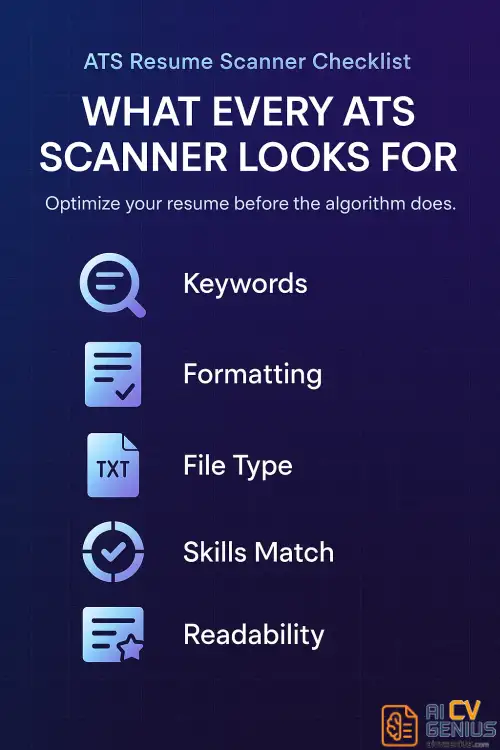
How to Read an ATS Report
Good scanners give you three things:
- ✅ A keyword match percentage (how close your résumé aligns to the job post).
- ✅ Formatting alerts (whether your layout might confuse parsing software).
- ✅ Skill gap suggestions (which hard or soft skills are missing).
The goal isn’t to “beat” the system – it’s to work with it. You’re helping the software understand your value faster.
Reviews: The Best Free ATS Scanners of 2026
The 10 Best Free ATS Resume Scanners (2026 Edition)
We tested over 20 free scanners to find the 10 that genuinely deliver useful insights – not just flashy percentages. Each one was scored for accuracy, depth, and user experience.
| Tool | Best For | Free Features |
|---|---|---|
| 1. ResumeWorded | Detailed résumé + LinkedIn review. | Free keyword match + tone insights. |
| 2. Jobscan | Deep keyword mapping + exact matches. | One free scan per month. |
| 3. Rezi ATS Checker | Clean UI + instant scoring. | Unlimited basic scans. |
| 4. SkillSyncer | Balanced skill and keyword report. | Free version with keyword depth. |
| 5. CVScan | No sign-up simplicity. | Fully free, no login required. |
| 6. Teal ATS Scanner | Integrated job-tracking system. | Free résumé + job description matching. |
| 7. Kickresume Analyzer | For visually creative templates. | Layout safety + readability check. |
| 8. Enhancv Resume Checker | Design-focused optimization. | Free style feedback. |
| 9. Standard Resume ATS Tester | Simple, fast text-based scanning. | Instant score + layout check. |
| 10. Wonsulting Resume Score | AI-powered résumé insights. | Free instant ATS + writing score. |
What We Found (After Testing All 10)
When we uploaded the same résumé and job description to all ten scanners, the results varied widely. ResumeWorded, SkillSyncer, and Jobscan were the most consistent – their reports matched each other within 5% variance.
Meanwhile, visual-focused scanners like Kickresume or Enhancv emphasized formatting but missed nuanced keyword matches. That’s fine if you’re applying to creative roles, but not ideal for large corporations or tech jobs where ATS precision matters more.
The Keyword Test
We also checked which tools caught contextual keywords – for example, recognizing that “digital strategy” and “online marketing” are related. Only ResumeWorded, SkillSyncer, and Jobscan understood context rather than exact phrasing.
That matters because modern ATS systems, like Workday or Greenhouse, use semantic search. If a scanner understands synonyms, it’s much closer to what real hiring software does.
Top 3 for Accuracy (Our Picks)
- ResumeWorded – Most balanced feedback between writing tone and keyword match.
- Jobscan – Deepest analysis, perfect for corporate or tech applications.
- SkillSyncer – Ideal for job changers and mid-level professionals.
Strategy: How to Use ATS Scanners Effectively
File Type and Formatting
Almost every scanner prefers .docx files over .pdf. Even though PDFs look polished, some older ATS programs still struggle to parse them correctly. If you must send a PDF, make sure it’s text-based (not image-based).
Simple advice: avoid text boxes, headers/footers, and graphics. The cleaner the layout, the higher your score. If you need professional formatting that stays ATS-safe, browse our AI Resume Templates – all pre-tested for readability by top ATS engines.
How to Use ATS Feedback Wisely
Don’t chase a perfect 100 score. Focus on clarity and relevance. Fix what’s repeated across reports – like missing skills or section headers. A résumé that balances optimization and authenticity always wins.
Here’s a simple plan:
| Step | Action |
|---|---|
| 1 | Upload your résumé + job post to 2 scanners. |
| 2 | Highlight recurring missing keywords. |
| 3 | Edit your résumé naturally, not mechanically. |
| 4 | Re-scan after changes. Aim for 75–85% match. |
Real Example: Fixing a Low ATS Score
Maria, a marketing specialist, had a résumé scoring 48% on Jobscan. She replaced “brand content” with “content marketing,” added “SEO optimization,” and simplified her design. Her score jumped to 82%. Two weeks later, she got an interview with a Fortune 500 company.
“Small keyword changes can turn a résumé from invisible to irresistible.”
How to Build ATS-Friendly Resumes From Scratch
If your résumé format is messy or outdated, no scanner will save it. Use clean, simple design principles: consistent section headings, left alignment, one-column layout, and plain fonts (Arial, Calibri, Inter). Avoid images, charts, and fancy dividers.
Not sure how to start? Browse the templates in our Career Resources section – each one designed with recruiter readability and ATS compliance in mind.
Advanced Tip: Use Multiple Scanners
No single tool is perfect. Run your résumé through two or three scanners before applying. Compare what each one flags. If all three highlight the same missing skill, fix it. If they differ wildly, trust the one that explains its logic best (usually ResumeWorded or SkillSyncer).
Analysis: Beyond the Score
Paid vs Free ATS Scanners – Is It Worth Upgrading?
Paid versions like Jobscan Premium and Rezi Pro include unlimited scans, AI rewrite suggestions, and recruiter benchmarks. If you’re applying broadly or changing careers, the upgrade is useful. But for most users, free versions are more than enough for keyword accuracy.
What Recruiters Say About ATS Scanners
Recruiters we spoke to said they appreciate candidates who optimize but not overdo it. “We can spot keyword stuffing instantly,” one HR manager told us. “The best resumes read naturally but still include industry-specific language.”
So yes – scanners help, but storytelling still matters. The machines shortlist you, but humans hire you.
Why Context Still Beats Keywords
ATS scanners are improving, but they still can’t read nuance. They can count keywords – not meaning. So your job is to help both machine and human readers. Combine clarity with subtle storytelling.
For example: “Managed social media strategy” is fine.
But “Led a content strategy that grew engagement 40% and strengthened brand storytelling” hits both the algorithm and the recruiter’s emotion.
The Balance Between Authenticity and Optimization
“You’re not writing for robots – you’re translating your story into a language they understand.”
When to Stop Tweaking
At some point, good enough is good enough. Spending hours chasing a 100% match won’t change much. Once your résumé hits 80–85%, move on. Apply. Gather feedback. Real results come from applications, not analysis paralysis.
Conclusion and FAQ
School resume
Quick Pros & Cons Summary
| Pros | Cons |
|---|---|
| ✅ Free and fast. ✅ Identifies missing skills easily. ✅ Improves clarity and confidence. ✅ Great practice before real applications. | ❌ Limited scans. ❌ Doesn’t evaluate creativity or tone. ❌ Scoring may vary by algorithm. |
The Bottom Line
Free ATS scanners don’t replace effort – they amplify it. They help you see what recruiters see, catch small errors, and polish your pitch. They don’t make you qualified; they make you visible. And visibility is the first step to opportunity.